Page 5 | 11
©2023
PRODUCT FUNCTION
NOTE: Identify the pump included with the ATLAS Mattress and follow the PRODUCT FUNCTION instructions
below for the specific pump.
ATLAS PUMP – PRODUCT FUNCTION
The functions of the ATLAS pump are described below.
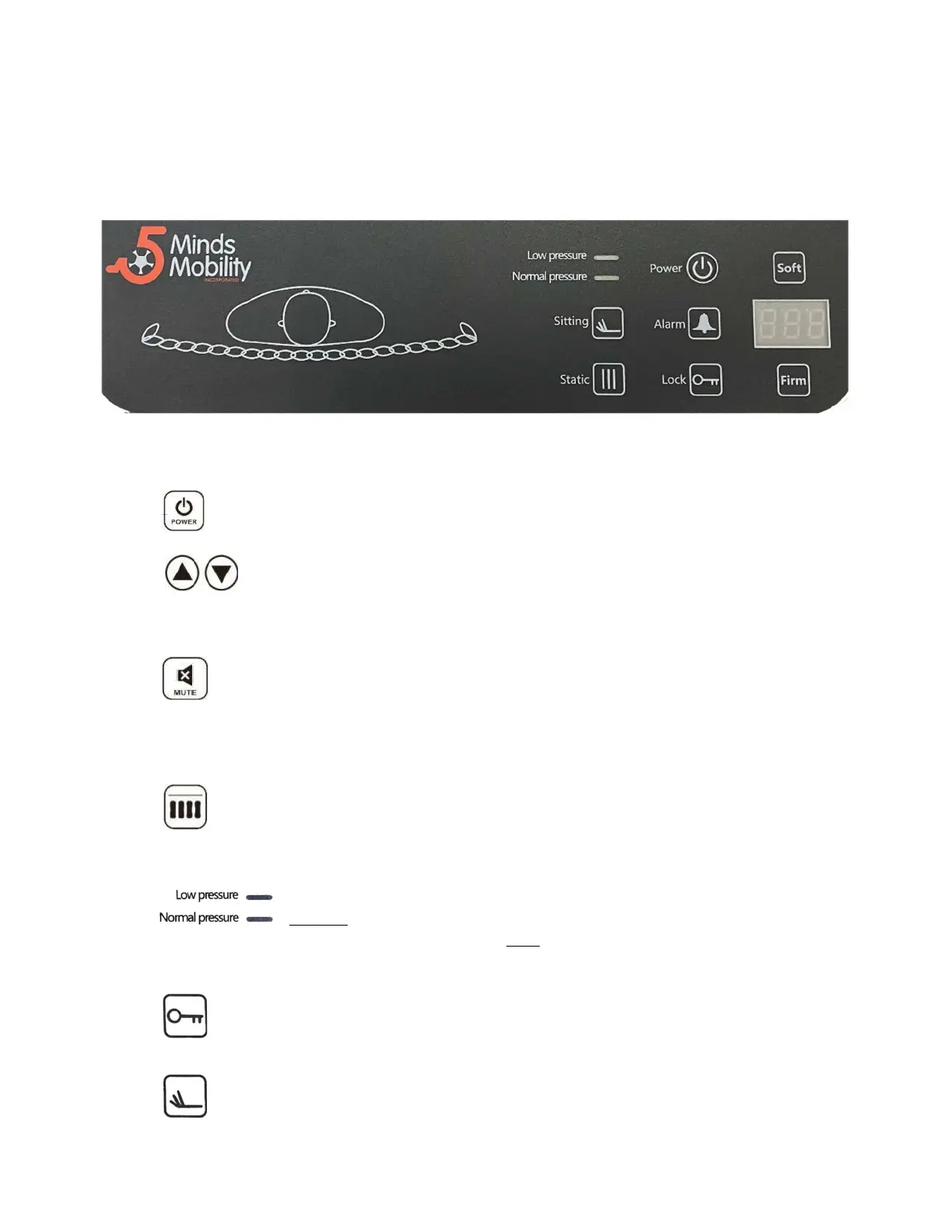
Press Power key on the panel, the pump will start/stop operation.
Press the Soft or Firm buttons to select the correct user weight while in Static
mode. Pressure adjustment setup and display range (30 - 180 Kbgs / 400 Lbs ).
Press the buttons firmly for quick adjustments up or down.
The audible alarm turns on when the mattress pressure is low. Check all hose
and connections to the pump and the mattress. The Alarm will also sound in
case of a Power Failure. Press the button to mute alarm, the LED will also go
out once it is disabled.
Press to set the mattress in static therapy mode. Both zones inflate together,
the Static LED will display “- - “. The function will revert to alternating mode
after 30 minutes.
Normal: A visible indicator (green) tells the pressure has reached
a preset or user- defined level. Low: A visible indicator (orange)
warns the pressure is below a preset or user- defined level.
Locks all functions after 2 minutes. To disable the lock function
press and hold the lock buttons for 3 seconds.
Sitting function provides extra support when the user is in the seated position
ensuring that the hip area does not bottom out causing a pressure issue.



 To Next Page