EasyManua.ls Logo

510 DESIGN Laurel - User Manual

510 DESIGN Laurel
3 pages
Print Icon
To Next Page IconTo Next Page
Loading...
Item
Parts List
Description
QTY
P1
H3
H2
H1
Item
Description
QTY
Hardware List
DISCLAIMER:
WHEN PROPERLY ASSEMBLED, THIS ITEM IS SAFE FOR INTENDED USE. SELLER IS NOT LIABLE FOR
ANY DAMAGES RESULTING FROM ITEM BEING IMPROPERLY ASSEMBLED AFTER PURCHASE.
Assembly Procedures:
Step 1. Assemble the Leg Metal Frame on a flat, soft surface such as carpet or cloth to prevent scratching the finish.
Attach the Leg Metal Frame (P3) to the Support Rail (P2) fully tighten bolts, as shown below.
Page 1 of 3
ASSEMBLY INSTRUCTIONS
Description: Laurel Desk
P2
H4
1
1
2
(H2)x2
(H3)x2
Lock Washers Ø1/4"
(H4)x2
(H5)x1
Flat Washers Ø1/4"
Allen Wrench M4
Bolts Ø1/4" x 38mm L
H5
H2
H3
H5
H6
H4
2
Bolts Ø1/4" x 15mm L
Bolts Ø1/4" x 38mm L
Lock Washers Ø1/4"
Flat Washers Ø1/4"
Top Frame
Support Rail
Question and Answer IconNeed help?

Do you have a question about the 510 DESIGN Laurel and is the answer not in the manual?

Summary

Important Safety Instructions

Assembly Procedures

Step 1: Attach Leg Metal Frame to Support Rail

Assemble the Leg Metal Frame (P3) to the Support Rail (P2) with specified bolts, lock washers, and flat washers.

Step 2: Attach Stretcher

Attach the Stretcher (P4) to the Leg Metal Frame (P3) and Support Rail (P2) using bolts, lock washers, and flat washers.

Step 3: Install Plastic Caps

Insert Plastic Caps (H6) into the designated holes for the bolts (H2).

Step 4: Attach Metal Frame to Top Frame

Assemble the metal frame to the Top Frame (P1) using specified bolts, lock washers, and flat washers.

Step 5: Final Assembly and Leveling

Turn the table upright and adjust levelers to ensure stability. Check all hardware.

Overview

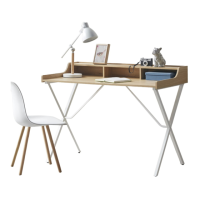
This document provides assembly instructions for the Laurel Desk, a piece of furniture designed for general use, likely as a workspace or study area. The desk is characterized by its metal frame construction, offering a sturdy and stable design.

Function Description:

The Laurel Desk serves as a functional surface for various activities, such as working, studying, or holding items. Its design incorporates a top frame for the primary work surface, supported by a metal leg frame and stretcher components that provide structural integrity. The desk is intended for indoor use and requires assembly by the user.

Important Technical Specifications:

Parts List:

  • P1 Top Frame: 1 unit. This is the main surface of the desk.
  • P2 Support Rail: 1 unit. A structural component that connects and supports other parts of the frame.
  • P3 Leg Metal Frame: 2 units. These form the primary support structure for the desk, creating its distinctive "X" shape when assembled.
  • P4 Stretcher: 2 units. These components connect the leg frames and support rail, adding stability and rigidity to the overall structure.

Hardware List:

  • H1 Bolts Ø1/4" x 15mm L: 2 units. Used for specific connections, likely where a shorter bolt is required.
  • H2 Bolts Ø1/4" x 38mm L: 8 units. These longer bolts are extensively used for attaching the leg frames, support rail, and top frame.
  • H3 Lock Washers Ø1/4": 10 units. These washers are crucial for preventing bolts from loosening over time due to vibrations or movement, enhancing the desk's long-term stability.
  • H4 Flat Washers Ø1/4": 10 units. These washers distribute the load of the bolt head over a wider area, protecting the material and ensuring a secure fit.
  • H5 Allen Wrench M4: 1 unit. The necessary tool for tightening all the bolts, included with the hardware.
  • H6 Plastic Cap Ø15mm: 4 units. These caps are used to cover exposed bolt heads, providing a cleaner aesthetic and potentially preventing snagging or injury.

Dimensions (Implied from hardware):

  • Bolts are 1/4 inch in diameter.
  • Bolt lengths are 15mm and 38mm.
  • Washers are 1/4 inch in diameter.
  • Plastic caps are 15mm in diameter.

Usage Features:

Assembly Process:

The desk requires a multi-step assembly process, designed to be straightforward but emphasizing the importance of following instructions carefully.

  1. Preparation: The first step involves assembling the Leg Metal Frame (P3) to the Support Rail (P2) on a flat, soft surface to prevent scratching. This step uses two H2 bolts, two H3 lock washers, two H4 flat washers, and the H5 Allen wrench.
  2. Stretcher Attachment: The Stretcher (P4) is then attached to the Leg Metal Frame (P3) and the Support Rail (P2). This step utilizes two H1 bolts, two H2 bolts, four H3 lock washers, four H4 flat washers, and the H5 Allen wrench. This step is critical for establishing the "X" shape of the leg structure and overall stability.
  3. Cap Installation: Plastic Caps (H6) are inserted into the holes covering the H2 bolts, providing a finished look and protecting the bolt heads. Four H6 caps are used in this step.
  4. Top Frame Assembly: The assembled metal frame is then attached to the Top Frame (P1). This final structural assembly step uses four H2 bolts, four H3 lock washers, four H4 flat washers, and the H5 Allen wrench.
  5. Finalization: After assembly, the table is turned to an upright position. The instructions explicitly state that failure to follow the assembly steps correctly may cause bolts to misalign.

Leveling: The desk includes levelers on each leg. Users are instructed to adjust these levelers (up or down) to ensure the desk is stable and level on uneven surfaces. This feature is crucial for preventing wobbling and ensuring a comfortable user experience.

Safety Recommendations:

  • Read Instructions: Users are advised to read all instructions carefully before beginning assembly.
  • Two-Person Assembly: For safety and ease of assembly, it is recommended that two or more adults assemble the desk.
  • Keep Instructions: Users should retain the instructions for future reference.
  • Hardware Management: Do not discard any packaging content until assembly is complete to avoid accidentally losing small parts or hardware. All parts and hardware should be taken out of the box before starting.
  • Proper Assembly: The manufacturer explicitly states that the item is safe for intended use when properly assembled. The seller is not liable for damages resulting from improper assembly.

Maintenance Features:

Regular Inspection and Re-tightening:

A critical maintenance feature highlighted in the manual is the need for periodic inspection and re-tightening of bolts. The instructions state: "BOLTS MAY LOOSEN DURING NORMAL EVERYDAY USE. THEY SHOULD BE PERIODICALLY INSPECTED AND RE-TIGHTENED TO PREVENT DAMAGE OR INJURY. ALWAYS CHECK TO ENSURE THAT ALL HARDWARE IS KEPT TIGHTENED." This emphasizes the importance of routine maintenance to ensure the desk remains stable, safe, and durable over time. The use of lock washers (H3) in the design also contributes to maintaining bolt tightness, but regular manual checks are still recommended.

Surface Protection:

The assembly instructions recommend assembling the desk on a flat, soft surface such as carpet or cloth. While primarily an assembly tip, this also implies a general care recommendation to prevent scratching the desk's finish during handling or movement, contributing to its aesthetic longevity.

In summary, the Laurel Desk is a user-assembled furniture item with a metal frame, designed for stability and functionality. Its key features include a detailed assembly process, integrated leveling capabilities, and a strong emphasis on safety and ongoing maintenance through regular hardware checks.

510 DESIGN Laurel Specifications

General IconGeneral
Brand510 DESIGN
ModelLaurel
CategoryIndoor Furnishing
LanguageEnglish

Related product manuals