03
4. Mounting the dash cam
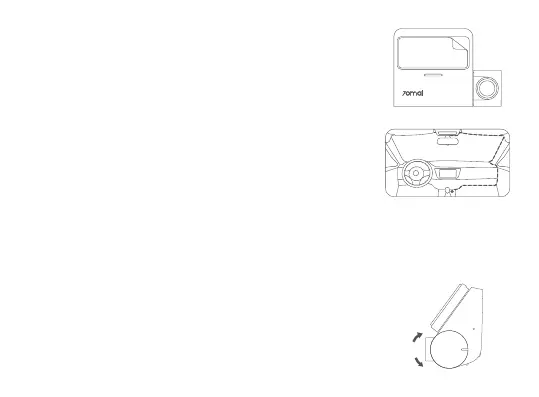
Peel off the protective film from the adhesive sticker on the base of
the mount, and paste the dash cam onto the electrostatic sticker in
the dotted area.
5. Connecting the power supply
As shown in the figure, run the power cord along the top of the
windshield, down the A-pillar, and around the glove compartment,
so that the power connector is near the cigarette lighter. Connect
the power cord to the car charger, then plug the charger into the
cigarette lighter socket.
6. Adjusting the dash cam angle
Turn on the dash cam and adjust the camera angle based on the
preview screen to ensure that the camera is facing the front of the
vehicle.
Note: Depending on the vehicle, the cigarette lighter socket may be located in a different position. The
above figure is for reference only.


 To Next Page