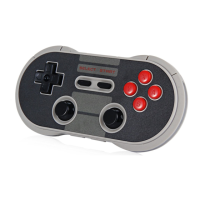
1-Press and hold POWER + A for 1 second to power on the controller,
LEDs will blink three times per cycle
2-Press and hold PAIR for 3 seconds to enter pairing mode.Vlue LEDs will rapidly blink
3-Go to your macOS device’s Bluetooth setting ,pair with [Wireless Controller]
4-LEDs will be solid blue when connection is successful.
.USB connection : connect your 8Bitdo controller to your macOS device via USB cable after step1
Switch (by default)
1.press and hold POWER+Y for 1 second to power on the controller,
LEDs will blink four times per cycle
2.Go to your Switch Home Page to click on Controllers,then click on Change Grip/Order
3.Press and hild PAIR for 3 seconds to enter pairing mode.Blue LEDs will rapidly blink
4.LEDs will be solid blue when connection is successful
.When Connected to your Switch ,POWER button = Switch HOME button;
PAIR button = Switch screenshot button
Battery
Status LED indicator
Low battery mode LEDS blink in red
Battery Charging LEDS blink in Green
Battery fully charged
LEDs stop blinking in
green
Built-in 480 mAh Li-on with 18 Hours of play time.
Rechargeable via USB cable with 1-2 hour charging time.
Press POWER for 8 seconds to force turn off your controller
Power Saving
1. Sleep mode -1 minute with no bluetooth connection
2. sleep mode – 15 minutes with Bluetooth connection but no use
3. Press POWER to wake up your controller
Support
.Please visit http://support.8bitdo.com for further information and additional support
Related Manuals:
1. 8Bitdo N30 / F30 User Manual N30 and F30 Instruction Manual • Please turn off the...
2. 8BITDO F30 Arcade Joystick User Manual FC30 Arcade Joystick Instruction Manual Everything...
3. 8Bitdo N30 Arcade Stick User Manual N30 Arcade Stick Instruction Manual Bluetooth Connection N30
Arcade Stick...
4. 8Bitdo SN30 Pro / SF30 Pro User Manual SN30 Pro and SF30 Pro Instruction Manual 1-Press START to...
5. 8Bitdo Twin Cube Speakers User Manual TwinCube Speakers Manual Press POWER button on each
speaker....
6. 8Bitdo Cube Speaker User Manual 8Bitdo Cube Speaker Everything Old Is New Again Thank You...



 To Previous Page
 Loading...