A-dec 500 12 O’Clock Delivery System Installation Guide
2 86.0466.00 Rev E
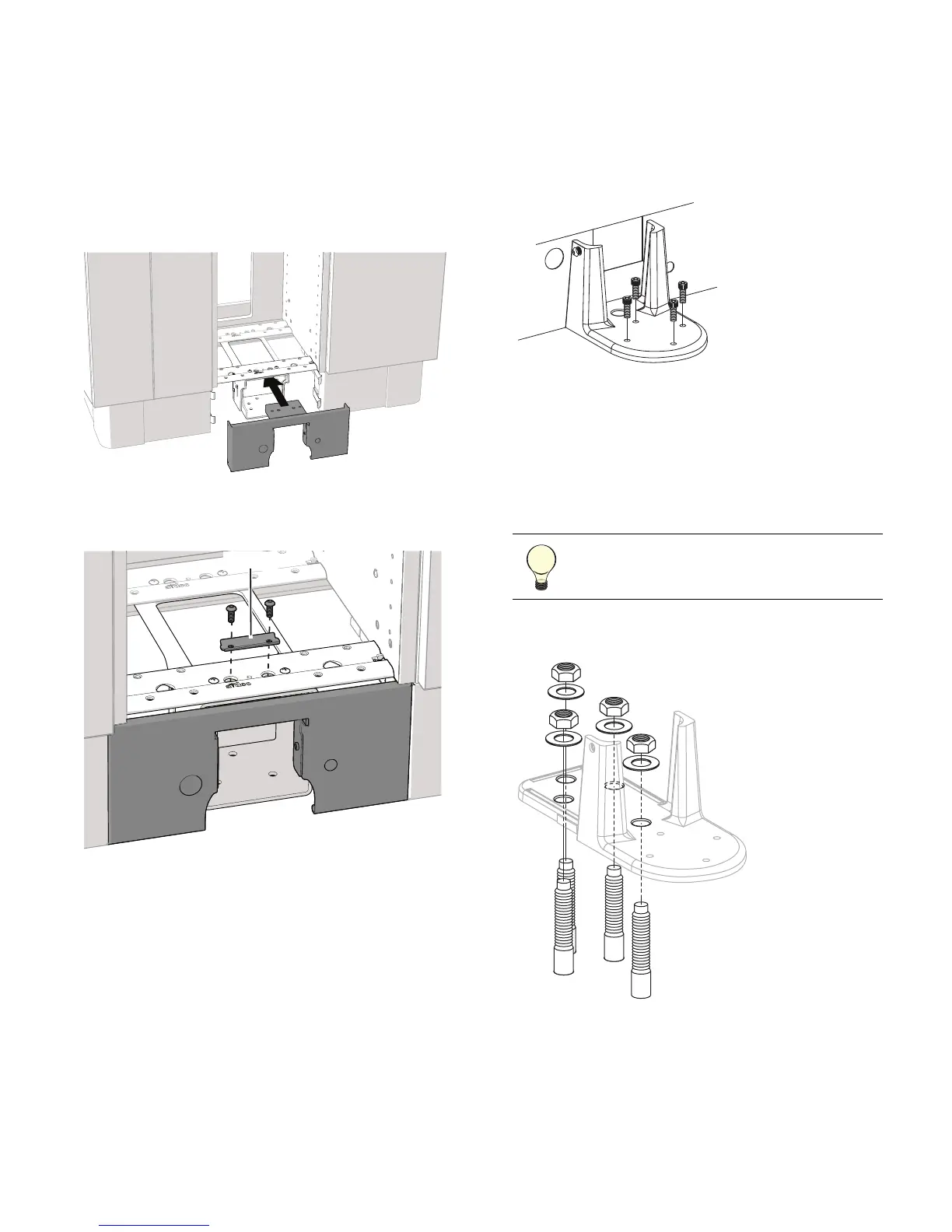
Install the Floor Mount
Install the Faceplate (A-dec Inspire 591
Treatment Center only)
You must install the faceplate on the A-dec Inspire 591
Treatment Center before installing the mount.
1. Slide the faceplate into position.
2. Use a 5/32" hex key, the washer, and two screws to
secure the faceplate.
Position the Mount
1. Remove the top cardboard tray and round
worksurface and set them aside.
2. Remove the mount from the plywood pallet and
discard the screws securing the mount to the
plywood.
3. Remove the mounting screws from the mount.
4. Remove the assembly from the box.
5. Slide the floor mount into position.
6. Locate the mounting holes for drilling.
Attach the Mount to a Concrete Floor
1. Drill the mounting holes:
(1) Drill 1/2" (13 mm) diameter holes 2-3/4"
(69.9 mm) deep.
(2) Remove debris from the holes.
2. Install four 1/2" x 4" concrete studs into the holes
and tighten the washers and nuts on the studs.
TIP A 12" long concrete drill bit is
recommended to make it easier to drill
inside the cabinet.


 To Next Page
 Loading...

