EasyManua.ls Logo

A-rival CarCam small - Switch Mode; Video Mode; Photo Mode

A-rival CarCam small
Print Icon
To Next Page IconTo Next Page
To Previous Page IconTo Previous Page
Loading...
20
2.4 Switch Mode:
There are 3 modes, including Video, Photo and Playback. Power on the DVR, press MODE to switch
Video/Photo/Playback mode.
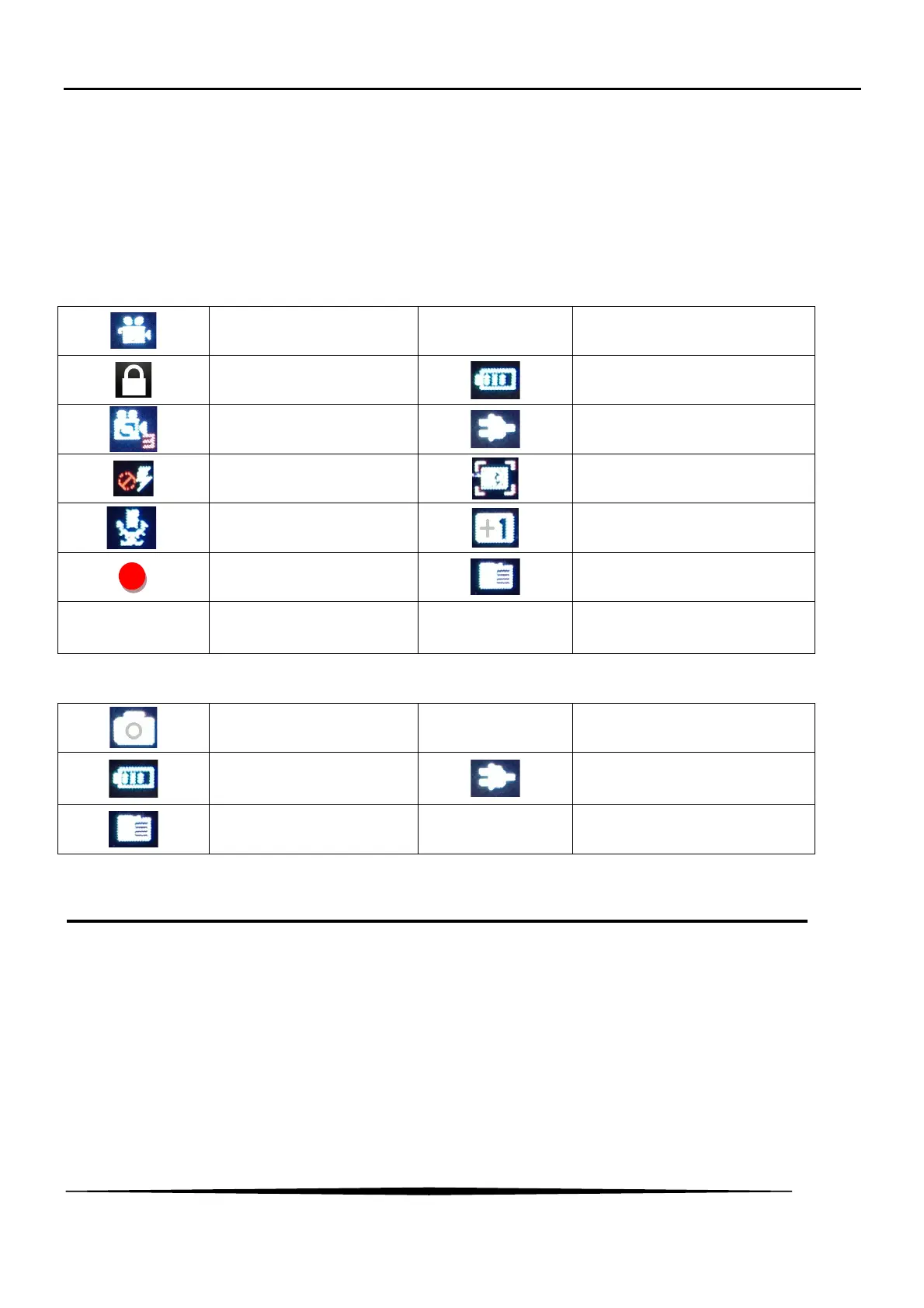
2.5 Icon and symbol:
2.5.1 Video Mode:
Video Mode
1080FHD
Video resolution
Protect file
Battery
Loop recording(3 mins)
Connect to the charger
lights indicator
Motion detection
Mic indicator
Exposure
Working indicator
Micro SD Card
00:28:39
Recording Time
2013/07/16
00:00:00
Time and Date
2.5.2 Photo Mode:
Photo mode
12M
Picture Pixels
Battery
Connect to the charger
Micro SD Card
01350
Remaining No. of pictures
3. Recording
DVR will enter into default recording mode when turn it on, the working indicator blinkers and indicates that it is
recording. The recorded file will be saved in the Micro SD Card automatically. Press OK to stop recording or
auto-ending when car switch off, the indicator LED will stop blinker.