EasyManua.ls Logo

A-T Controls Triac TMC-4 - User Manual

A-T Controls Triac TMC-4
24 pages
Print Icon
To Next Page IconTo Next Page
Loading...
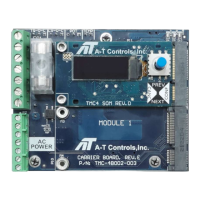
TMC-4 Control Card
for Electric Actuators
Installation & Maintenance Manual
1 07/02/21
www.atcontrols.com IOM08139 REVISION 04
Installation and Operation Manual
TMC-4 Control Card (v3.00)
Features
4-20mA, 0-10VDC, 0-5VDC, Potentiometer,
Open/Close command inputs
4-20mA or 0-10VDC self-powered transmitter
Programmable fail positions on loss of command
signal: In Place, CW, CCW, % Value
LCD screen with 5-point joystick for menu navigation
Expansion module slot
External brake control for spring return actuators
Motor temperature monitor by thermistor input
Sleep mode
Overview
The Triac TMC4 control card is a motor controller intended to be used in electric actuators rated for running current loads
up to 10 amps. The TMC4 control card is available in two versions. An AC version can drive reversible AC motors with a
85-250VAC supply voltage, or a DC version can drive DC motors with a 24VDC supply voltage.
The LCD screen provides easy viewing of status and configuration while a 5-point joystick allows easy navigation through
the various configuration menus and settings. An optional module slot permits expansion on the capabilities of the
controller to support various communication busses or other control and interface options.
The TMC4 provides two main positioning options; proportional or two position. When operated as a proportional controller,
the TMC4 compares an external command signal to a position feedback from a potentiometer connected to the output
shaft of the actuator. When the two signals differ by a given magnitude, the TMC4 controller will energize the motor to
operate either clockwise or counterclockwise to reduce the difference between the two signals. When operated as two-
position controller, the TMC4 receives an open or close command, and drives the actuator clockwise or counterclockwise
until activation of a position limit switch is detected.
The TMC4 is designed to be mounted using PEM Snap-Top spacers for easy mounting and removal without the need for
screws, while still providing a secure mount for most conditions.
The TMC4 must be installed in an appropriate enclosure to avoid electrical shocks. When operating,
high voltages will be present on the controller, requiring caution during the installation process. Power
should be deenergized before making wire connections to the TMC4. A heater and thermostat should
be used when possible, to prevent condensation.
Question and Answer IconNeed help?

Do you have a question about the A-T Controls Triac TMC-4 and is the answer not in the manual?

A-T Controls Triac TMC-4 Specifications

General IconGeneral
ModelTMC-4
TypeTriac
Input Voltage120 VAC
Output Voltage120 VAC
Number of Channels4
Mounting TypeDin Rail
Current Rating4A
CategoryControl Unit

Summary

Layout

Dimensions

Details the physical size and mounting dimensions of the TMC-4 Control Card.

Wiring and Operation

Terminals

Explains the function of each terminal connection on the TMC-4 Control Card.

Wiring Diagrams

Provides visual representations of various wiring configurations for the TMC-4 Control Card.

Input; Output Signal Configurations

Details how to connect analog and digital input/output signals to the TMC-4 Control Card.

Menu

STATUS Screens; MANUAL Mode

Displays system status and enables manual actuator control via the joystick interface.

COMMAND CONFIG submenu

Configures command signal type, zero/span, and loss of signal behavior for actuator control.

FEEDBACK CONFIG submenu

Sets up and calibrates the feedback signal type and values for actuator positioning.

POSITION CONFIG submenu

Defines position limits, type (limit switch or potentiometer), and switch logic.

COMMS CONFIG submenu

Configures communication protocol, unit ID, baud rate, and parity settings.

AUX. I;O CONFIG submenu

Configures auxiliary digital and analog inputs/outputs for expanded control capabilities.

SYSTEM CONFIG submenu

Manages system settings such as motor type, cycle counts, and factory default restoration.

Setup and Calibration

Feedback Potentiometer Setup

Guides the setup and calibration of the feedback potentiometer for accurate positioning.

Position Limit Switches

Details the setup and function of position limit switches for two-position control.

Stop;Torque Limit Switches

Explains the use of stop/torque limit switches to halt actuator movement.

Analog Control Calibration

Procedure for calibrating analog command and feedback signals for proportional control.

Two-Position Control Calibration

Steps to calibrate the actuator for on/off, two-position operation using limit switches.

Communication Bus Control Calibration

Instructions for configuring optional communication bus modules like Modbus or Profibus.

Reverse Action; Direct Action

How to configure the actuator to respond directly or in reverse to control signals.

Options

Motor Temperature Monitor

Monitors motor temperature and adjusts duty cycle to prevent overheating.

Troubleshooting

Specifications