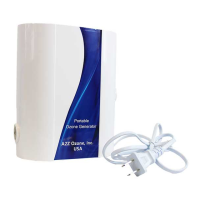
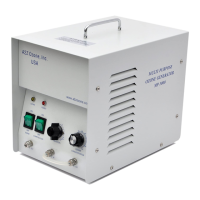
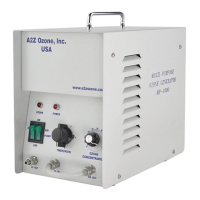
The A2Z Ozone A7K is an ozone generator designed for industrial use, specifically for shock treating rooms with strong odors such as pet odor, smoke odor, cooking odor, and skunk odor. It is crucial to note that this unit should not be used for odors caused by flammable items or solvents, and it is intended for use only in unoccupied spaces due to the high concentration of ozone produced. In the state of California, ozone generators are for industrial use only.
Function Description
The A7K operates by producing ozone (O₃) to neutralize odors. It offers two ozone plate settings: Plate 1, which produces 3500 mg/hour, and Plate 2, which also produces 3500 mg/hour. When both plates are activated, the unit achieves its maximum output of 7000 mg/hour, a setting recommended for more severe odors like smoke. The unit includes a fan to circulate the ozone throughout the treatment area and to cool the unit after operation.
The device features various timer functions, allowing for one-time operation or repeat cycles. After an ozone generation cycle, the fan continues to run for an additional 30 minutes to ensure proper cooling of the unit and to further circulate the air, aiding in ozone dispersion. This cooling period is critical to prevent damage to the ozone plates.
Important Technical Specifications
- Model: A7K
- Voltage: 110 V
- Frequency: 50/60 Hz
- Power and Fan Settings: 95W, 98W, 100W (depending on fan speed and plate activation)
- Ozone Output: 3500 to 7000 mg/hour
- Timer Settings: 30 minutes, 1 hour, 2 hours, or 4 hours
- Air Flow Rate: 50, 100, 150 CFM (Cubic Feet per Minute)
- Dimensions: 10 x 5 x 11 inches (306 x 134 x 268 millimeters)
- Weight: 13 lbs / 6 Kg
- Runtime Options: One time, Repeat time setting, Run once every 12 hours, Run once every 24 hours
- Active Ingredient: Ozone
- EPA Est.: 95432-KY-1 (USA), 95432-CHN-1 (China)
Usage Features
The A7K can be operated directly from its front panel or via a remote control (batteries not included).
Front Panel Controls:
- Power Button: Turns the unit on/off. There's also a rocker switch on the back.
- LED Power Indicator: Shows if the unit is ON/OFF.
- Repeat Cycle Button: Activates/deactivates the repeat cycle function.
- Repeat Timer Indicator: Lights up when the repeat cycle is active for 1 hour.
- 12 Hours / 24 Hours Indicators: Show if the 12-hour or 24-hour repeat timer function is active.
- O₃ Plate Selection Button: Activates one ozone plate, both ozone plates, or deactivates them.
- Plate 1 activated: 3500 mg/hour output.
- Plate 2 activated: 3500 mg/hour output.
- Plate 1 / Plate 2 Indicators: Show which ozone plates are active.
- Fan Speed Button: Changes fan speed (Low, Medium, High).
- Low Fan / Medium Fan / High Fan Indicators: Show current fan speed. High fan speed is recommended for larger areas.
- Remote Signal Receiver: Receives signals from the A7K remote.
- Timer Button: Sets the unit's timer function.
- 30 Minutes / 1 Hour / 2 Hours / 4 Hours Indicators: Show the selected timer duration.
Remote Control Functions:
The remote control mirrors the main functions of the unit's front panel, including Power, Repeat Timer, Plate Selection, Fan Speed, and Timer settings, providing convenient operation.
Operating Instructions:
- Plug the power cord into the unit and a wall socket.
- Turn on the rocker switch on the back of the unit.
- Press the power button on the front panel or remote. The unit typically starts with low fan speed and plate selection.
- Select ozone plate output (one plate or both).
- Choose fan speed (Low, Medium, High).
- Set the timer duration (30 minutes, 1 hour, 2 hours, or 4 hours).
- Optionally, activate the repeat cycle function for continuous operation at set intervals (e.g., run for 30 min, rest for 30 min, and repeat). Repeat cycles can be set for 12 or 24 hours.
Important Safety Warnings for Usage:
- Remove people, pets, and plants from the treatment area before operation.
- Do not breathe ozone directly.
- Do not enter the treated room until 2-4 hours after the machine has turned off.
- Ensure the room is well-ventilated (e.g., open windows) before re-entry.
- Ozone has a half-life of 30 minutes, meaning it dissipates quickly.
- Do not use around flammable substances or solvents.
- Do not ozonate freshly painted rooms due to potential adverse reactions with paint chemicals.
For Best Results:
- Seal the room completely, including vents, before treatment.
- Place the unit in the center of the room for even ozone dispersion.
- Increase fan speed and treatment time for larger rooms.
- Activate both plates for severe odors.
- Allow sufficient time for ozone to dissipate before re-entering (e.g., 6-8 hours after a 4-hour cycle).
Maintenance Features
Regular maintenance ensures the longevity and proper functioning of the A7K.
Rocker Switch Fuse Change:
- Unplug the unit and its power cord.
- Locate the fuse between the back rocker switch and the power cord connector.
- Use a small, flat screwdriver to remove the fuse holder.
- Check and replace the fuse (a spare fuse is typically located in the spare fuse holder).
- Press the new fuse into place.
Board Fuse Change (behind the front cover):
- Ensure the unit is off and unplugged.
- Remove screws from the front of the unit.
- Locate the fuse on the control board.
- Remove the fuse (may require a slight pull).
- Place the new fuse where the old one was and press until it clicks into place.
- Note: Differences exist between old and new A7K control boards; identify your unit's board before maintenance.
- Main Power Switch: If off, no power to the unit.
- Power Input: Where the power cord plugs in.
- Main Fuse Holder: Holds the fuse that typically blows and a spare fuse.
Cleaning Plates:
Ozone plates should be cleaned regularly to extend their life and maintain optimal performance. They should be replaced after 2 years or 2000 hours of use, or sooner in dusty/polluted conditions.
- Ensure the unit is off and unplugged, and the plates are cooled.
- Remove screws from the side of the unit and air vent (6 screws total).
- Carefully remove the outside cover.
- Use a flat, straight razor blade to scrape oxidized materials from the plates. Avoid hitting soldered areas.
- Scrape across the grid lines evenly.
- Clean oxidized materials from the razor blade as needed.
- Repeat until the metallic finish of the plate returns.
- Use a paper towel or blow across the plates to remove any remaining oxidized material.
- Replace the outside cover and screws.
- Connect the power cord and test the unit. A purple glow from the ozone plate indicates proper function.
Troubleshooting:
- No Power: Check the main fuse (next to the power input) and the control board fuse (behind the front panel). If an indicator light flashes when the power button is pressed, power is present but not distributing through the system.
- Only Back Power Is On: If the rocker switch is on but no power on the control board, check the 12 VAC transformer located behind the bottom right-hand corner on the front cover.
- No Ozone:
- Look for a purple glow from the ozone plates through the side vents. If there's no glow or it's spotty, the plates need replacement (Order C-3500 Ceramic Ozone Plates Set).
- If the unit is in "Repeat Mode," the ozone plates will turn off after the cycle until the next ozonation cycle. The fan will continue to run.
- Ensure plates are selected using the O₃ Plate Selection Button.


 To Next Page
 General