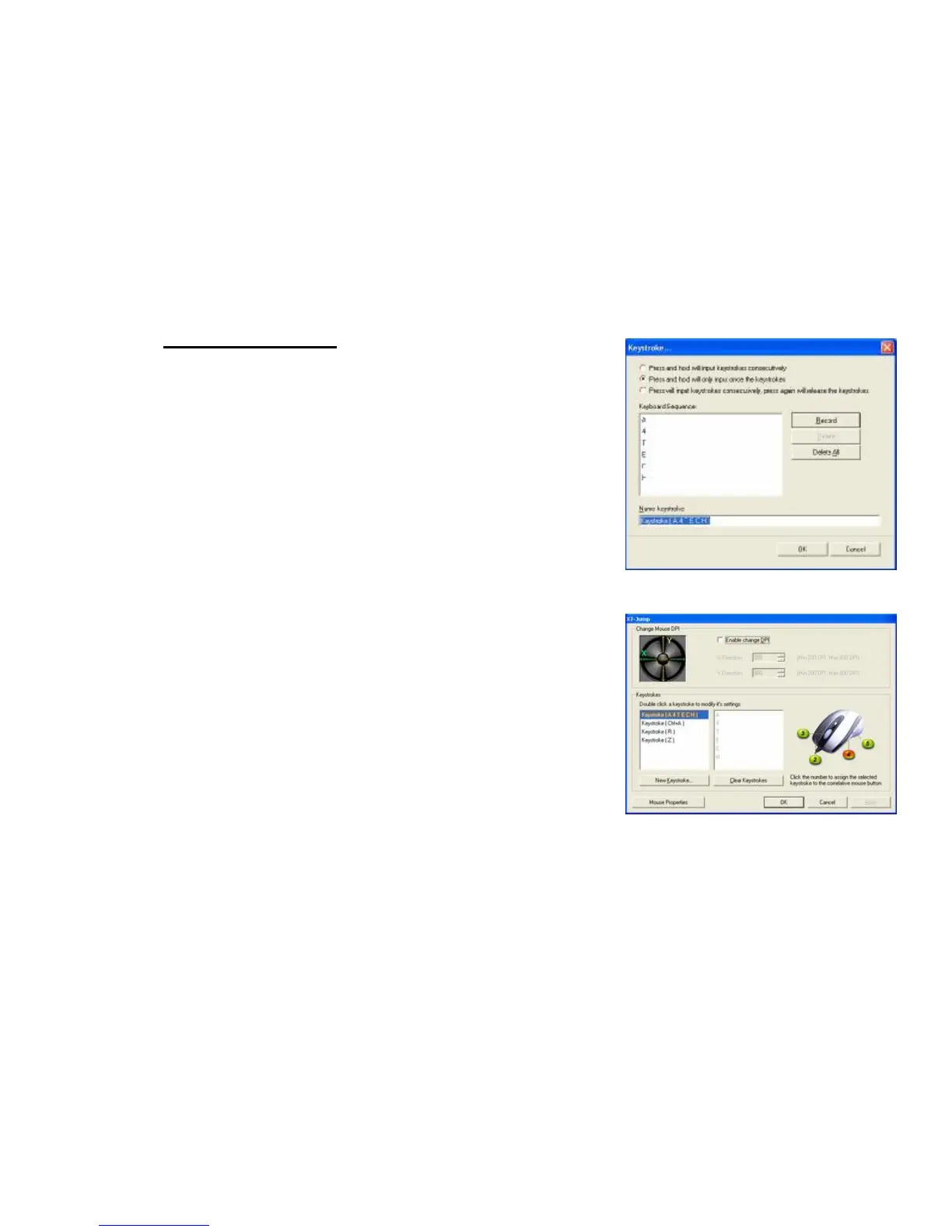
Example 3: Select 2
nd
Radio Button
1. Click on “Record” (Image E)
2. Press “A4TECH” on the Keyboard
3. Click “OK”
4. It will bring you back to previous page
5. Now click on “Keystroke(A4TECH)”, the one you just created
6. Select the Mouse Button (green icon) on the Mouse Image to your right
to store the “Keystroke (A4TECH)”.
7. Green icon will turn red once it’s been selected. (Image F)
8. Click “Apply”, then “OK”
We have stored it in Mouse Button # 4.
Let’s try it on regular word document and on game application.
l Try it on Word Document. Press and hold your mouse button #4.
Did you see the only character “A4TECH” even though you have press
and hold? This is partially simulation. You may store your most
frequently used word, for instance, you first name.
l Try it on Game Application. Press and hold your mouse button # 4.
In Counter Strike, “Keystroke (A4TECH)” means nothing. So when you
try it in counter strike, it will do nothing.


 To Next Page