32
Changing the date
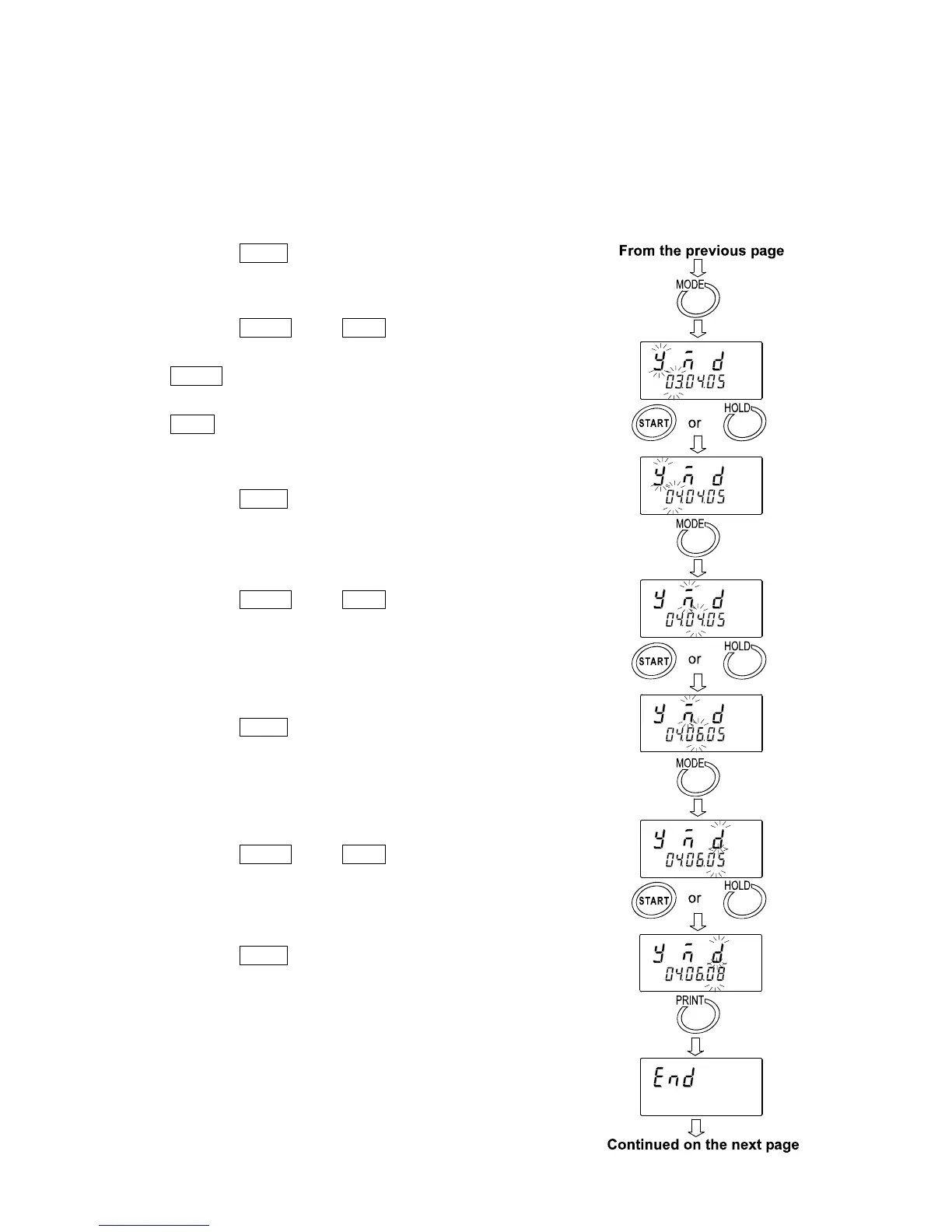
The date is changed in the selected displaying order.
The following is an example when the order of " y " (Year), " m " (Month) and " d " (Day) is selected.
5 Press the MODE key to select the setting value
of " y " (Year). (Example:03)
6 Press the START key or HOLD key to change
the year. (Example:03→04)
START key Increases the value of the blinking
digit by one.
HOLD key Decreases the value of the
blinking digit by one.
7 Press the MODE key to select the setting value
of " m " (Month). (Example:04)
8 Press the START key or HOLD key to change
the month. (Example:04→06)
9 Press the MODE key to select the setting value
of " d " (Day). (Example:05)
10 Press the START key or HOLD key to change
the day. (Example:05→08)
11 Press the PRINT key to save the date.
After " end ", the current time is displayed.


 To Next Page