- 5 -
Identifying the Parts
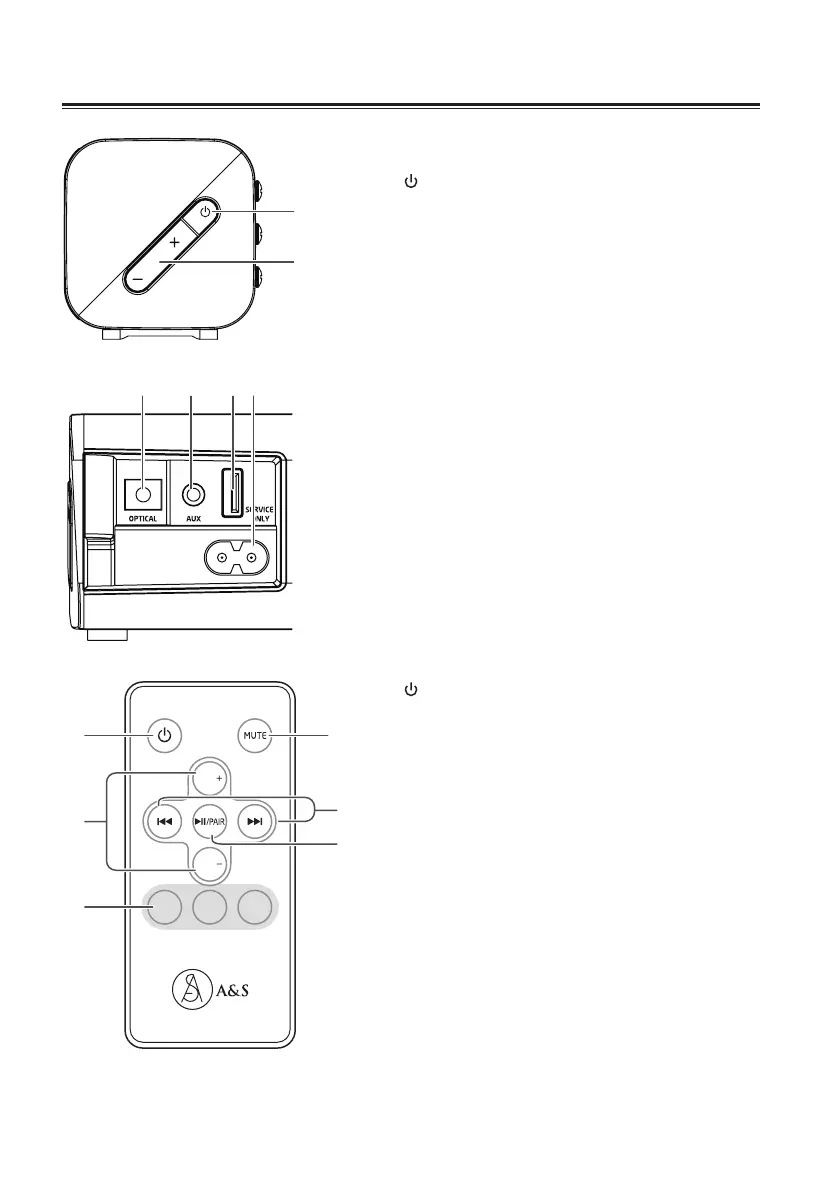
Main Unit
1
Turn On/Off the unit.
Select the play function.
2 + / -
Increase or decrease the volume level.
Rear View
1 OPTICAL Socket
Connect to an external audio device.
2 AUX Socket
Connect to an external audio device.
3 SERVICE ONLY Socket
The USB socket is for service only. It is not designed
to charge smartphones, tablets or similar devices.
4 AC~
Socket
Connect to power.
Remote Control
1
Turn On/Off the unit.
2 MUTE
Mute or resume the sound.
3 VOL+/VOL-
Increase/decrease the volume level.
4 Function buttons
Select the play function.
RED: Power off
GREEN: AUX
BLUE: Bluetooth
WHITE: OPTICAL
5
H
,
G
Skip to previous/next track in Bluetooth mode.
6
BF
/PAIR
Play/pause/resume playback in Bluetooth mode.
Press and hold to activate the pairing function in
Bluetooth mode or disconnect the existing paired
Bluetooth device.
AC~
AUX
BT OPTICAL
VOL
VOL


 To Next Page