Need help?
Do you have a question about the AAON Orion ASM01819 and is the answer not in the manual?
E-BUS Digital Room Sensors are used to sense Space Temperature only or Space Temperature & Space Humidity.
Details about the functions and capabilities of the E-BUS Digital Room Sensors.
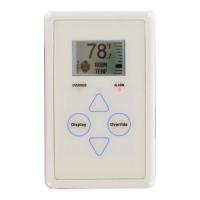
Description of the physical buttons and LED indicators on the E-BUS Digital Room Sensor.
How the sensor operates upon power-up and its initial display readings.
Explanation of the different LED indicators and their meanings.
Operating temperature and humidity limits for the E-BUS Digital Room Sensor.
Guidelines for safely connecting E-BUS cables with other wiring.
Instructions and considerations for physically installing the sensor.
Information on using the included mounting plate for installation.
Overview of the three main display screens on the sensor.
Details of the screen displaying room temp, humidity, and mode.
Description of the screen showing outdoor environmental data.
Information displayed about the connected controller's ID and software.
How to access and use the screen for adjusting setpoints.
Explanation of different operating modes shown on the sensor display.
Steps to diagnose issues with the temperature-only sensor.
Procedure for testing sensor resistance using a multimeter.
Table correlating temperature values with resistance for the thermistor.
Guide to accessing and using the sensor's configuration and test menus.
Instructions for performing a pixel test on the LCD display.
How to access sensor information and test the LEDs.
Options for configuring and testing the LCD backlight behavior.
Procedure for setting the sensor's communication address.
Settings for temperature averaging and sample rates.
Wiring diagram and instructions for connecting to VCCX2/VCB-X controllers.
Wiring details for connecting a wall-mounted CO2 sensor.
Wiring instructions for connecting the sensor to a VAV/Zone controller.
Instructions for connecting external temperature sensors to the digital room sensor.
Modifications for connecting a remote sensor to a temperature-only model.
Wiring steps for connecting a remote sensor to a temp/humidity model.
Detailed dimensions for the optional mounting plate.
The E-BUS Digital Room Sensor is a sophisticated environmental control device designed for use with AAON's Orion Control Systems. It is available in several models, including those that sense Space Temperature only, or a combination of Space Temperature and Space Humidity. Some models feature an LCD display with buttons, while others are designed for a more discreet, no-display installation.
The primary function of the E-BUS Digital Room Sensor is to accurately measure and display environmental conditions within a space. Depending on the model, it can sense:
The sensor communicates with AAON's VCCX2, VCB-X, or VAV/Zone Controllers via EBC E-BUS cables. These cables are specifically designed for this purpose and should not be run in conduit with AC line voltage wiring or conductors carrying highly inductive loads to prevent interference.
For models equipped with an LCD display and buttons (ASM01819 & ASM01820), the E-BUS Digital Room Sensor offers a rich set of user interaction features:
<Display>, <Override>, <Up>, and <Down>. These buttons allow users to navigate through various screens and adjust settings. Additionally, certain functions can be accessed by touching the area below the <Display> and <Override> buttons.<Override> button allows users to temporarily force the VAV/Zone Controller or VCCX2 / VCB-X Controller into Occupied Operation from an Unoccupied state. The Override LED blinks to indicate an override request and stays on for the duration of the override. Users can also cancel an active override by touching the <Override> button again.LED Indicators: The sensor incorporates several LEDs to provide status information:
The E-BUS Digital Room Sensor includes features and guidelines to aid in its maintenance and troubleshooting:
 General
| Model | ASM01819 |
|---|---|
| Manufacturer | AAON |
| Category | Accessories |
| Type | Orion |
| Application | Orion units |

 To Next Page