4
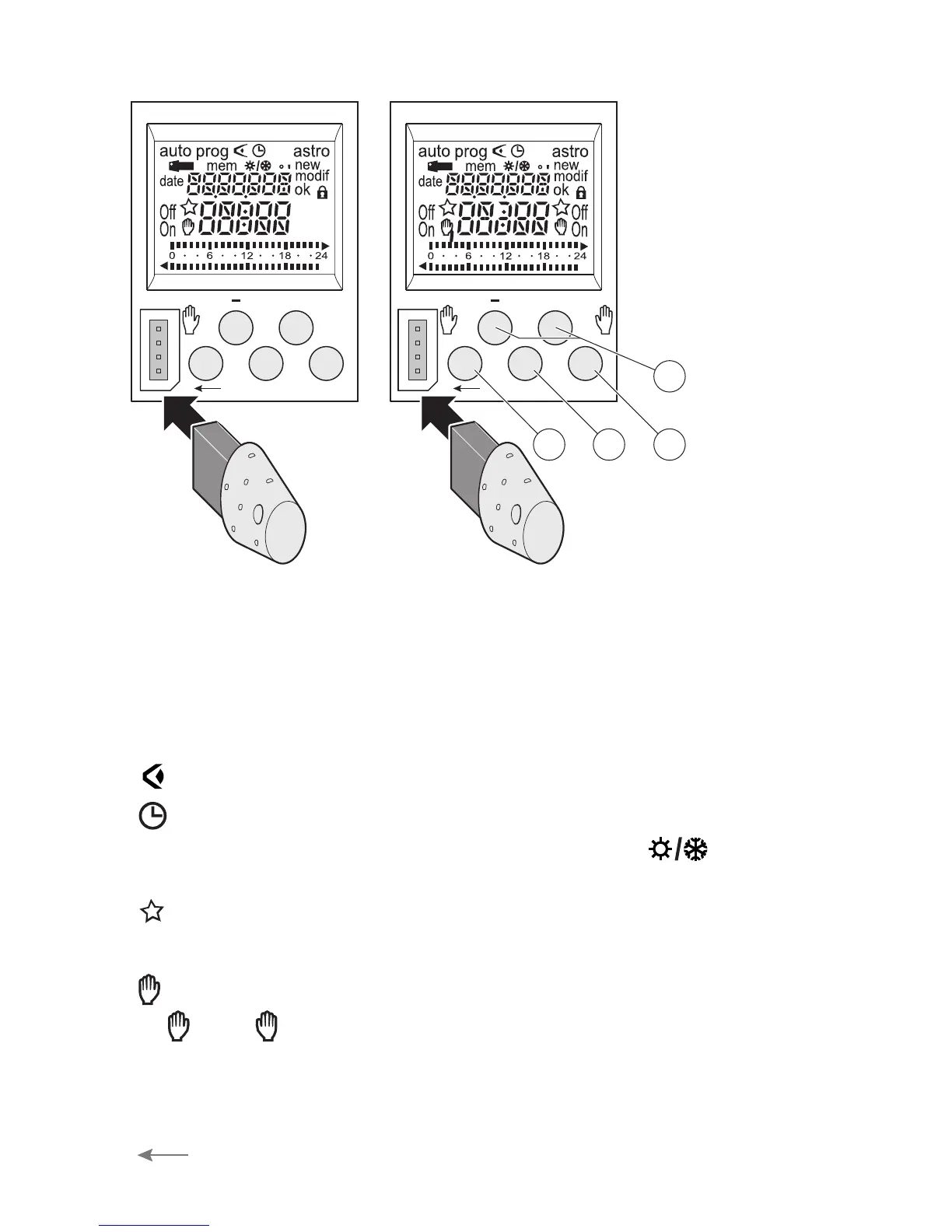
Keys:
➀
menu : selection of operating mode.
auto : mode of running according to the program selected.
prog : new for programming mode.
prog : modif to modify an existing program.
: checking of the program.
: modification of time, date and selection of
the winter/summer timechange mode
astro : astronomical mode.
: indicates that the channel is in astronomical mode.
➁
+ and - : navigation or setting of values.
- (TWA-1)
C1 , C2 (TWA-2) : in auto mode, selection of overrides,
or waivers.
➂
enter : to validate flashing information on display.
➃
: to return to the previous step.
enter
menu
+
C2
C1
enter
menu
+
3
1
4
2
DT-VK
TWA-2TWA-1
You may return
into auto mode
at any moment
using menu.
If no action is
taken for 1 min.,
the switch
returns into auto
mode.


 To Next Page