Page 4
EXERCISE 1 : DIGITAL IC TESTER
ACTION
Identify the sections of the IC Tester using description and Schematics.
DESCRIPTION
On first opening the IC Tester there is normally no part loaded from the device library.
Within the TestFlow the part is already loaded and cannot be changed by the user, this
reduces operator error and speeds up testing.
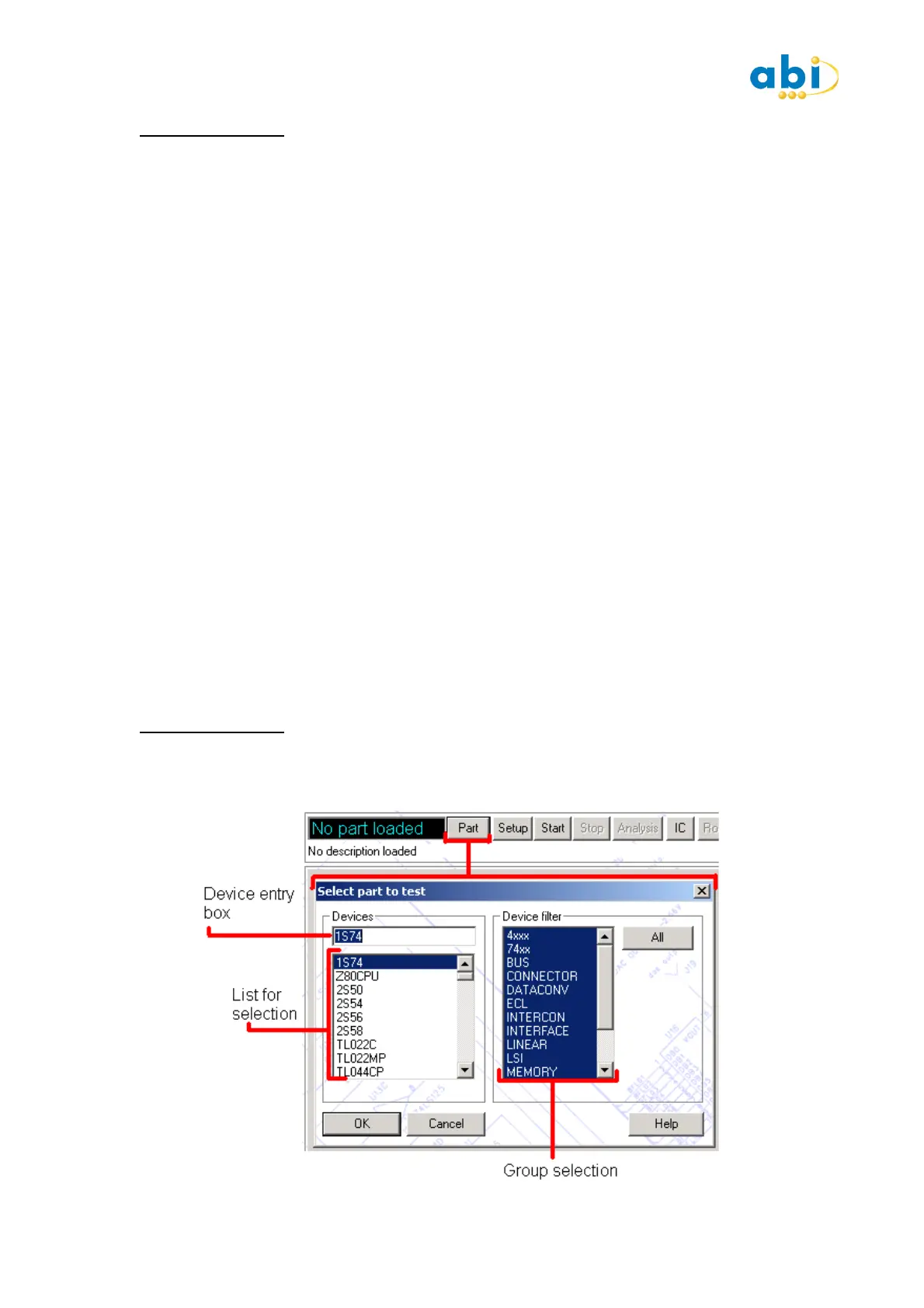
The PART button takes you to the device selection screen.
The SETUP button takes you to the test type, mode and comparison setup screen.
The START/STOP buttons execute and terminate the tests.
The ANALYSIS button opens the Analysis (test results) window.
The IC button toggles between the IC diagram and V-I views after the test is completed.
The ACTUAL/MASTER toggles changes between views when comparing two test results.
The Arrow controls (<< < > >>) are used to step through individual pins or groups of pins
in the V-I curve view.
COMMENT
When running a TestFlow, control and setup is limited for the user, this is normally of great
benefit. For this instance it is advisable that familiarity with creating and using TestFlows is
done after you have completed the Training Board.
EXERCISE 2 : DEVICE LIBRARY SELECTION
ACTION
View picture below and description to see the manual device selection methods.


 To Next Page
 Loading...