P. 8
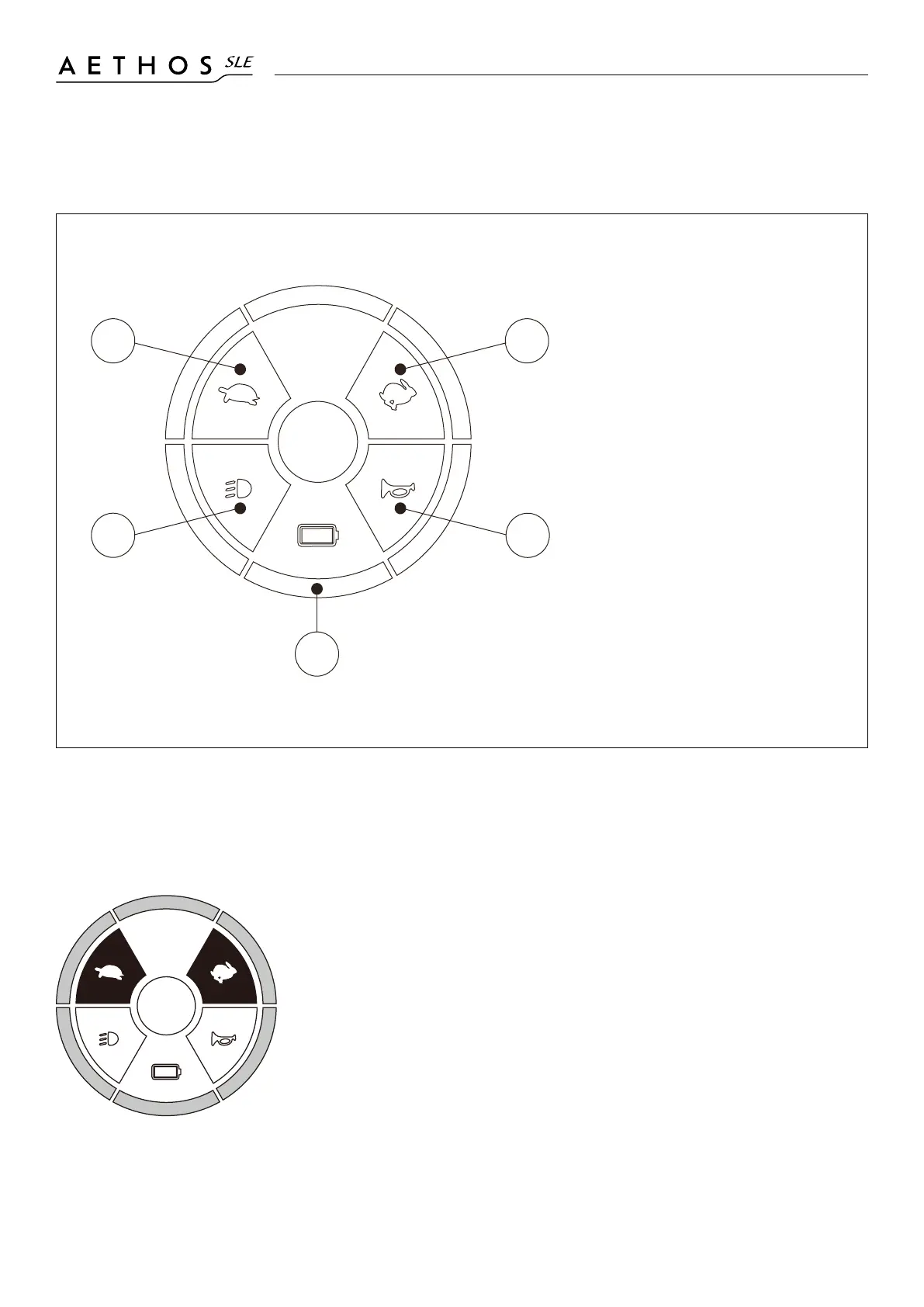
4.1 IDENTIFICATION & OPERATION OF CONTROL PANEL
PANEL BACKLIGHT ADJUSTMENT
• Turn [ON] key switch
• Press and hold both acceleration [1] & deceleration [2]
buttons, then turn [OFF] the key switch.
• Wait for 2 seconds. The setting LED will ash.
• Exit the setting mode by pressing [3] or [4].
If no key is pressed within 15 seconds, the scooter will
automatically exit the setting mode.
• Turn [OFF] Key switch
1
2
3
4
5
1. Speed Deceleration
Press to decrease speed
2. Speed Acceleration
Press to increase speed
3. Head-light / Tail-light
Switch
Press to turn on headlight
and tail light
4. Horn
Press to sound warning
tone when necessary
5. Battery Gauge / Error
Light Indicator
Showing battery status or
errors


 To Next Page