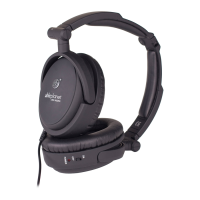
Identify the left (L) and Right (R) designations located on each side of the headband. The
headband adjusts for a comfortable t by sliding the top and side of the headband apart
as seen in Illustration B. Place one hand on the top of the headband and the other hand on
the side of the headband and pull in opposite directions to adjust the size of the headband,
and then, place them on your head. Now you can make minor adjustments to create a
comfortable t.
Note: Pulling down aggressively on the ear cups may damage the headphone. You may want to
make several small adjustments to achieve a perfect t. Always wear the headphones so the cable
is positioned on your left.
Adjusting Your Headphone
for a Comfortable Fit
7


 To Next Page