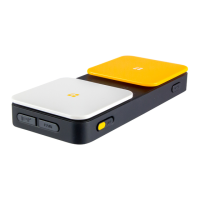
The AbleNet Blue2 FT is a Bluetooth-enabled assistive technology device designed to provide an alternative method of access for individuals who are unable to use a computer, tablet, or smartphone with a typical Human Interface Device (HID). It facilitates access to these devices, including computer or tablet-based speech-generating devices, by allowing users to operate them through switch activation.
Function Description
The Blue2 FT acts as a wireless switch interface, connecting to devices via Bluetooth and sending keyboard commands (Space, Enter, 1, 2, 3, or 4) when its integrated FeatherTouch switch tops or external wired switches are activated. This enables users to interact with switch control software on their connected device. The device features two FeatherTouch switch tops (S1 and S2) that can be configured to send different keyboard commands. It also supports the use of one or two wired accessibility switches plugged into its S1 and S2 jacks. When wired switches are used, the FeatherTouch switch tops and visual feedback lights are deactivated, but auditory feedback remains active.
The device includes a Keyboard Eject Button to force the display or hide of an onscreen keyboard on the connected device. It provides both visual and auditory feedback upon switch activation, which can be toggled on or off independently using dedicated switches. A Status Indicator Light provides visual cues for pairing mode, successful pairing, low battery, and charging status.
Important Technical Specifications
- Switch Type: Electronic
- Switches: 2
- Activation Type: Touch
- Activation Force: 0-oz / 0-og
- Activation Surface: 2.5-in / 63.5-mm diameter circle
- External Switch Input: (2) 3.5-mm TS jacks
- Connection: Bluetooth
- Frequency: 2.4 GHz
- Battery: Li-ion rechargeable
- Battery Charging Jack: USB C
- Product Dimensions: 6.2-in L x 2.7-in W x 1.05-in H / 157.5-mm L x 68.6-mm W x 26.7-mm H
- Product Weight: 5.7-oz / 158-g
- Mounting Inserts: Qty 2, 6-32 Thread, .25-in / 6.4-mm depth, 3.54-in / 90-mm center distance apart
- Suitable Operating Systems: Windows 11, macOS Ventura, iPadOS 16, iOS 16, ChromeOS
- Material: Housing - ABS Plastic, Non-Skid Feet - Silicone
- Suggested Operating Environment:
- Ambient Temperature Range: 32°F - 95°F (0°C - 35°C)
- Humidity: 10% - 95% (no condensation on device)
- Suggested Transportation and Storage:
- Ambient Temperature Range: 32°F - 104°F (0°C - 40°C)
- Humidity: 10% - 95% (no condensation on the device)
Usage Features
- First Time Use & Pairing: To use the Blue2 FT, users must first turn on the device and enable Bluetooth on their computer, tablet, or smartphone. The Status Indicator Light will flash blue, indicating pairing mode. Users then select "BLUE2 FT XXXXX" (where XXXXX is the serial number) from their device's Bluetooth settings. Upon successful pairing, the Status Indicator Light will remain solid blue for approximately three seconds. If pairing mode times out or the device is already paired, holding the Bluetooth Pairing Button for about 10 seconds will re-initiate pairing mode.
- Switch Top Configuration: By default, the blue switch top (S1) sends the "Space" command, and the yellow switch top (S2) sends the "Enter" command. These commands can be changed to Space, Enter, 1, 2, 3, or 4. To change a command, the Keyboard Command Mode Switch is moved to the "on" position (background turns green), the desired switch top (or wired switch) is activated to cycle through commands, and then the Keyboard Command Mode Switch is moved to the "off" position (background turns red) to save the selection.
- Feedback Control: Auditory and visual feedback are enabled by default. They can be turned on or off using the dedicated Visual Feedback Switch and Auditory Feedback Switch. The background of these switches turns green when on and red when off.
- Sleep Mode: After 20 minutes of non-use, the Blue2 FT enters sleep mode. It can be woken up by touching either switch top.
- Mounting: The device includes two threaded inserts for mounting, compatible with 6-32 screws. Users are cautioned not to insert screws more than .5-in / 12-mm into the housing to prevent damage. The recommended screw length is the thickness of the mounting material plus 0.25-in / 6.4-mm.
- Call System Access: The Blue2 FT is not recommended for use as access to a call system.
- Water Resistance: The device is neither waterproof nor completely water resistant and should not be immersed in liquids or have liquids spilled on it.
Maintenance Features
- Charging: When the battery is low (approximately 5% remaining), the Status Indicator Light double flashes red every second. To charge, a USB C cable is plugged into the USB C Charging Jack and connected to an appropriate AC adapter. During charging, the Status Indicator Light flashes red on and off. Once fully charged, it remains solid red as long as it's plugged into an AC adapter.
- Cleaning: Before disinfecting, the device should be cleaned by turning it off, removing batteries (if applicable), and wiping down with cleaning wipes to remove any dirt or debris. A cotton swab soaked with cleaner can be used for tight areas. The device should be allowed to dry completely.
- Disinfecting: After cleaning, the device should be disinfected using a clean towel or wipes with Virucidal, Bactericidal, Pseudomonacidal, Tuberculocidal, or Fungicidal properties. These chemicals must remain wet on the device for at least 4 minutes to be effective. Cotton swabs can be used for tight areas. The device must air-dry entirely before use. If the device has a touch screen, a liquid glass cleaner can be used to remove smudges.
- Preventative and Regular Maintenance: No scheduled maintenance is required beyond cleaning.
- Reusability: For reuse with another patient, the Blue2 FT should be sent back to the manufacturer for cleaning, testing, and refurbishment.
- Proper Disposal: The Blue2 FT contains a lithium-ion battery and electronic components. It should not be disposed of with normal household or business waste but rather with a licensed electronics recycler that accepts lithium-ion batteries.

 Need help?

 To Next Page
 General