REPLACING THE ELECTROMAGNET
Replacing the
Electromagnet
! CAUTION
●
Be
sure to unplug the pump unit.
●
When
performing replacement work, the pump body may still be hot and you could
get burned. So please wait until the pump has cooled before
han
dling.
●
Be
sure to remove the chamber block and the actuating rod before replacing
the
electromagnet.
●
It
is
better to let an experienced technician handle the soldering process.
Take
precautions against getting burned.
S
S
T
T
E
E
P
P
1
1
REMOVAL OF ELECTROMAGNET
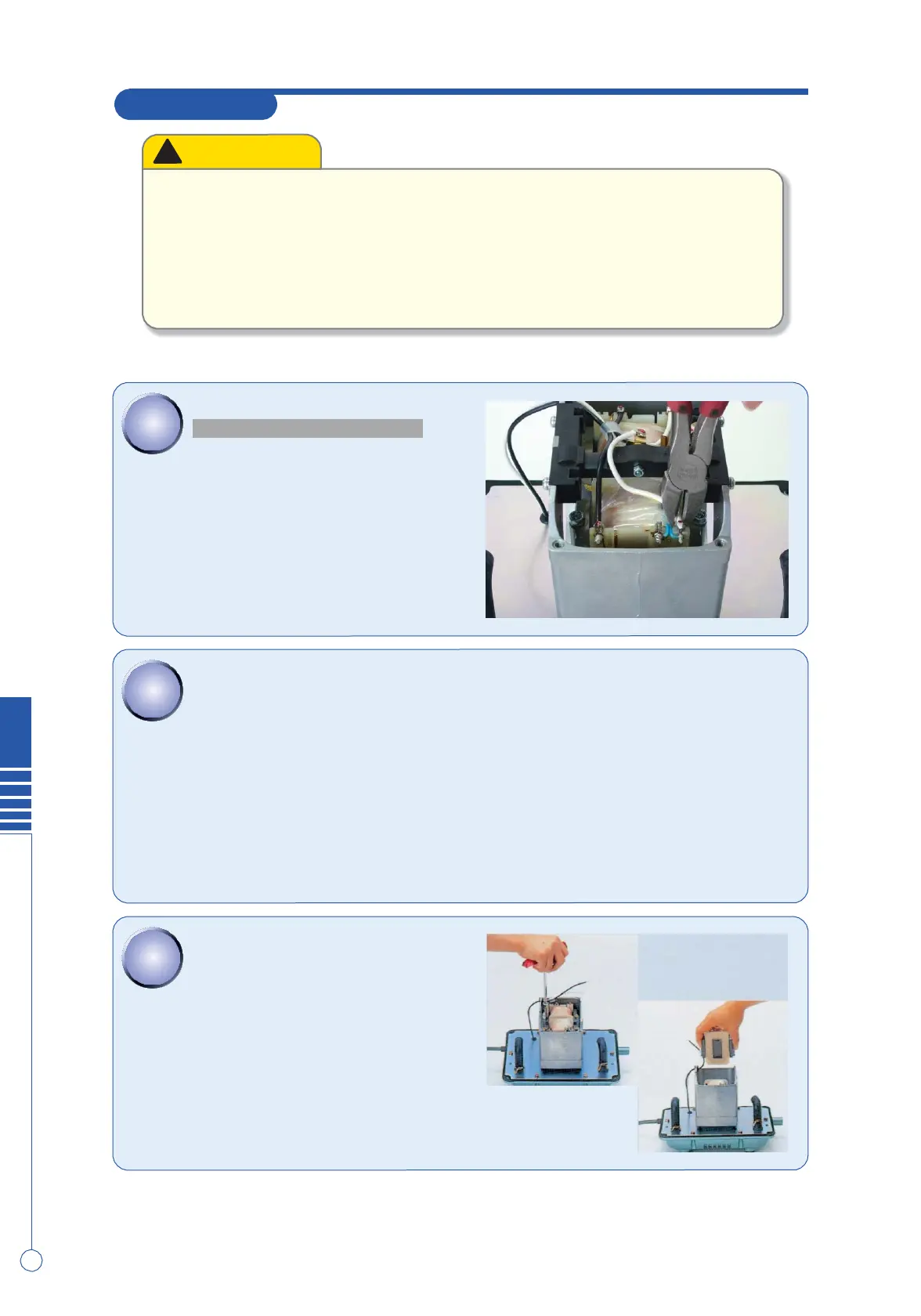
Cut the wire from the terminals on electromag-
nets with
nippers.
●It is
recommended
that you make a note of the
wiring.
S
S
T
T
E
E
P
P
2
2
Loosen the screw, fixing SP switch and remove it
.
(There are hexagonal nuts at SP switch side. Be
sure not to lose them as they fall inside the
unit.)
S
S
T
T
E
E
P
P
3
3
Remove the nuts by the box driver.
(8mm
wrench)
Pull out the
electromagnet
from the pump
body.
8


 To Next Page