7
ELEMENTOS DE VISUALIZACIÓN
Y FUNCIONAMIENTO
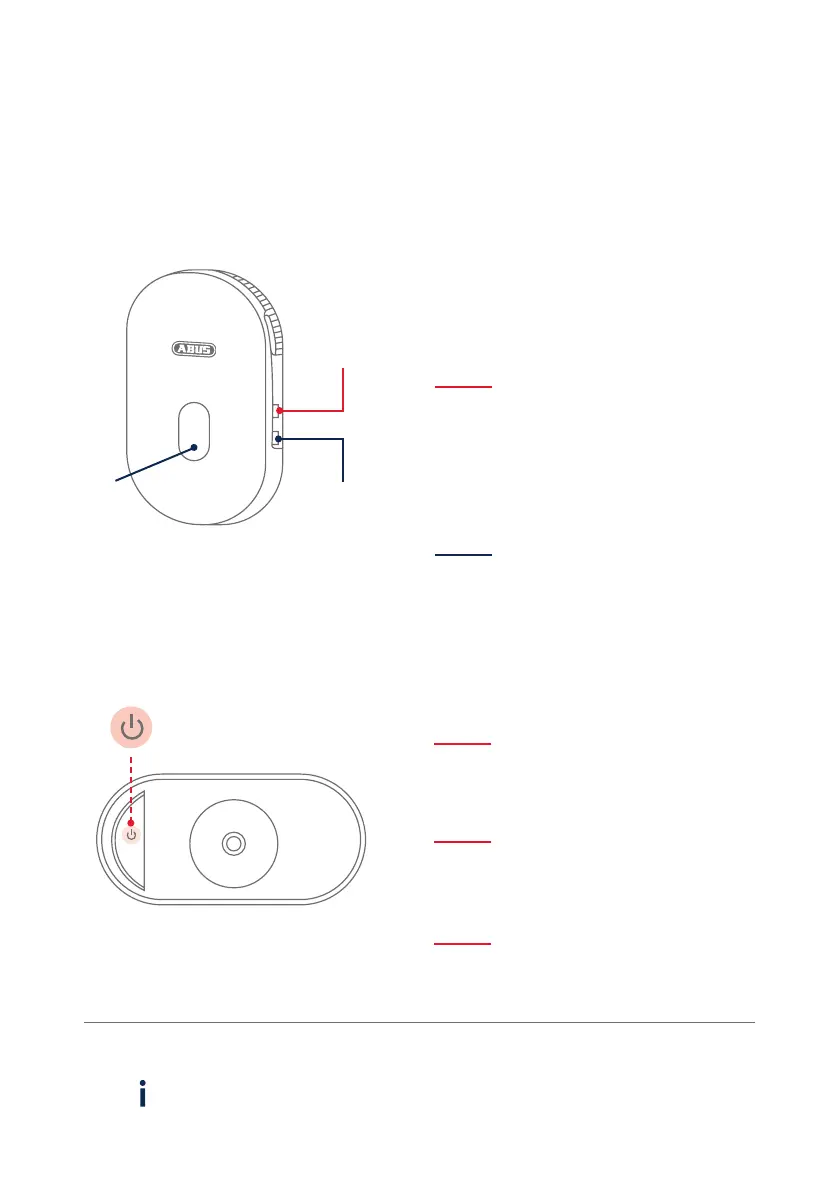
OPERATION AND DISPLAY ELEMENTS
Tecla ON/OFF y PAIRING
ON/OFF and PAIRING button
Tecla Reset
Reset button
LED
Tecla de
emparejamiento
Pairing button
Restablecer los ajustes de fábrica:
Mantener la tecla pulsada durante
5 s hasta que el LED rojo parpadee.
Resetting to factory settings:
Press and hold the button for
5seconds until the red LED ashes.
Encender la cámara:
Pulsar brevemente la tecla una vez.
Switching on the camera:
Press the button once brie y.
Función de emparejamiento:
Pulsar brevemente latecla 3 veces.
Pairing function:
Press the button three times brie y.
Apagar la cámara:
Mantener la tecla pulsada durante 5 segundos.
Switching o the camera:
Press and hold the button for 5seconds.
La unidad base solo se puede utilizar con corriente eléctrica activa.
The base station can only be operated with an active power supply.
Disposición de conexión (emparejamiento):
Mantener la tecla pulsada durante
3 s, hasta que el LED azul parpadee.
Connection readiness (pairing):
Press and hold the button for
3seconds until theblue LED ashes.



 To Next Page