EasyManua.ls Logo

Abus Resettable 160 Series - User Manual

Abus Resettable 160 Series
2 pages
Print Icon
To Next Page IconTo Next Page
Loading...
160 Series Resettable
The combination is set at the factory to open at 0-0-0-0
To open, turn each wheel to 0 and depress the shackle
To lock, scramble the wheel and depress the shackle
TO CHANGE THE COMBINATION
1. Pull up shackle
2. Turn setting screw clockwise until you hear and fell a click
(about 120 degrees)
3. Select your own combination
4. Important, turn setting screw to original position (screw slot must
be in line with shackle)
180 Series Resettable
The combination is set at the factory to open at 0-0-0-0
To open turn each wheel to 0 and depress the shackle
To lock, scramble the wheel and depress the shackle
TO CHANGE THE COMBINATION
1. Open the padlock
2. Insert the change tool key into the keyhole on the side of the lock
3. Push the change key in as far as it will go and turn 90 degrees in
either direction. WARNING if the change key is not push in fully, then
the combination may be lost
Leave the change key in the keyhole.
4. Set the wheels to the new number. Make sure the numbers are
aligned horizontally, other wise the combination may be lost
5. Turn the change key back to its original position, then pull it out.
The lock is now set to the new combination
6. To Lock, turn one or more wheels and depress shackle
170 Series Resettable
The combination is Set at the factory to open at 0-0-0-0
To open turn each wheel to 0 and depress the shackle
To lock, scramble the wheel and depress the shackle
TO CHANGE THE COMBINATION
1. Open lock
2. Press change pin down into open shackle hole as far as it will go
If pin is not fully depressed, then a lost combination will result
3. Leave pin in shackle hole
4. Set the wheels to your own combination
5. Pull out change pin. Lock is now set to your new combination
6. To lock, turn one or more wheels and depress shackle
Resettable
Combination Padlocks
Instructions
Over for more information
Question and Answer IconNeed help?

Do you have a question about the Abus Resettable 160 Series and is the answer not in the manual?

Summary

160 Series Resettable

How to Change the Combination

Instructions for changing the combination on the 160 Series Resettable padlock, including selecting a new combination.

180 Series Resettable

How to Change the Combination

Steps to change the combination for the 180 Series Resettable padlock using a change tool key.

170 Series Resettable

How to Change the Combination

Procedure for changing the combination on the 170 Series Resettable padlock by pressing a pin.

145 and 155 Series Resettable

How to Change the Combination

Instructions for changing the combination on the 145 and 155 Series Resettable padlocks.

158 Series Resettable

How to Change the Combination

Steps to change the combination for the 158 Series Resettable padlock, involving shackle depression.

190 Series Resettable

How to Change the Combination

Procedure for changing the combination on the 190 Series Resettable padlock using a key.

Overview

This document provides instructions for several series of ABUS resettable combination padlocks, including the 160, 180, 170, 145, 155, and 190 Series. These padlocks are designed for security with user-settable combinations.

General Function Description

All listed ABUS combination padlocks function by allowing the user to set a personalized numerical combination to lock and unlock the device. They are initially set to a factory combination (typically all zeros) and can be reset to a new combination by following specific procedures for each series. To open the padlock, the correct combination must be entered, and the shackle depressed or opened. To lock, the shackle is closed, and the wheels are scrambled to hide the combination.

Series Resettable

Function Description: The 160 Series is a resettable combination padlock. It comes with a factory-set combination, usually 0-0-0-0. To open, the user turns each wheel to 0 and depresses the shackle. To lock, the wheels are scrambled, and the shackle is depressed.

Usage Features (To Change the Combination):

  1. Pull up the shackle.
  2. Turn the setting screw clockwise until a click is heard and felt (approximately 120 degrees).
  3. Select your desired new combination.
  4. Crucially, turn the setting screw back to its original position, ensuring the screw slot is aligned with the shackle.

Series Resettable

Function Description: The 180 Series is also a resettable combination padlock, factory-set to open at 0-0-0-0. To open, each wheel is turned to 0, and the shackle is depressed. To lock, the wheels are scrambled, and the shackle is depressed.

Usage Features (To Change the Combination):

  1. Open the padlock.
  2. Insert the change tool key into the keyhole on the side of the lock.
  3. Push the change key in as far as it will go and turn it 90 degrees in either direction. A warning is given that if the change key is not pushed in fully, the combination may be lost. The change key should be left in the keyhole.
  4. Set the wheels to the new desired number. It's important to ensure the numbers are aligned horizontally; otherwise, the combination may be lost.
  5. Turn the change key back to its original position, then pull it out. The lock is now set to the new combination.
  6. To lock, turn one or more wheels and depress the shackle.

Series Resettable

Function Description: The 170 Series is a resettable combination padlock, factory-set to open at 0-0-0-0. To open, each wheel is turned to 0, and the shackle is depressed. To lock, the wheels are scrambled, and the shackle is depressed.

Usage Features (To Change the Combination):

  1. Open the lock.
  2. Press the change pin down into the open shackle hole as far as it will go. A warning states that if the pin is not fully depressed, a lost combination will result.
  3. Leave the pin in the shackle hole.
  4. Set the wheels to your desired new combination.
  5. Pull out the change pin. The lock is now set to your new combination.
  6. To lock, turn one or more wheels and depress the shackle.

and 155 Series Resettable

Function Description: These series are resettable combination padlocks, factory-set to open at all 0's. To open, each wheel is turned to 0, and the shackle is opened. To lock, the shackle is closed, and the wheels are scrambled.

Usage Features (To Change the Combination):

  1. Open the padlock.
  2. Turn the shackle 90 degrees facing you. Press the shackle down into the notch and hold. A warning is given that if the shackle is not fully depressed, a lost combination will result.
  3. While holding the shackle down, select your desired new combination.
  4. Release the shackle and close the padlock.
  5. Scramble the combination. The lock is now closed and set to your new combination.

Series Resettable

Function Description: The 158 Series is a resettable combination padlock, factory-set to open at 0-0-0. To open, each wheel is turned to 0, and the shackle is opened. To lock, the shackle is closed, and the wheels are scrambled.

Usage Features (To Change the Combination):

  1. Open the padlock.
  2. Turn the shackle 90 degrees facing you. Press the shackle down into the notch and hold. A warning is given that if the shackle is not fully depressed, a lost combination will result.
  3. While holding the shackle down, select your desired new combination.
  4. Release the shackle and close the padlock.
  5. Scramble the combination. The lock is now closed and set to your new combination.

Series Resettable

Function Description: The 190 Series is a resettable combination padlock, factory-set to open at 0-0-0-0. To open, each wheel is turned to 0, and the shackle is pushed down. To lock, the shackle is closed, and the wheels are scrambled.

Usage Features (To Change the Combination):

  1. Open the padlock.
  2. Insert the key firmly and rotate it 90 degrees clockwise.
  3. Reset the combination to your desired new setting.
  4. Turn the key back 90 degrees and remove it.
  5. Scramble the combination.
  6. Push down the shackle to close. The lock is now closed and set to your new combination.

Maintenance Features

The instructions do not explicitly detail maintenance features beyond the combination resetting process. However, the design of these padlocks, particularly those with a change tool key or internal pin mechanism, suggests that proper operation relies on keeping these mechanisms free from obstruction and ensuring components are fully engaged during the resetting procedure. The warnings about lost combinations if steps are not followed precisely highlight the importance of careful handling during combination changes. No lubrication or cleaning instructions are provided in this document.
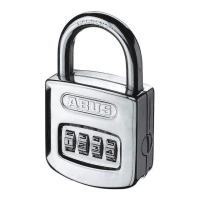
Abus Resettable 160 Series Specifications

General IconGeneral
BrandAbus
ModelResettable 160 Series
CategoryLocks
LanguageEnglish

Related product manuals