12
UK
Confirm your input by pressing: .
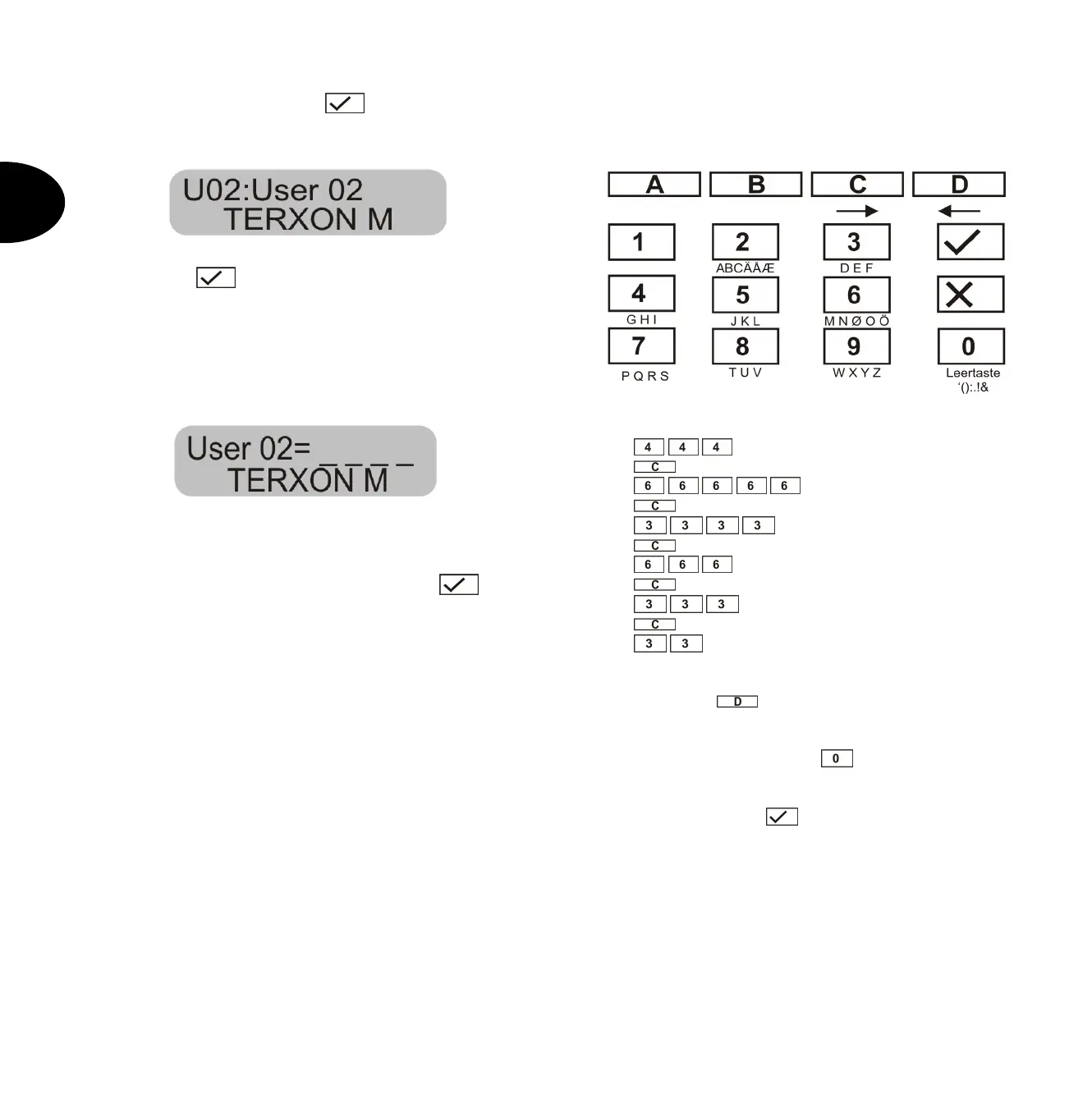
The control unit shows:
If you do not want to change the user name, press the
following key: . If you want to change the name, see
the section “Changing a name” on page 11.
After confirming the input of the user name, you are asked
to enter the new user code.
The control unit shows:
Enter the new four-digit code. Do not use a “0” (zero) as
the first digit.
Confirm your input and press the following key: .
IMPORTANT: To delete a code, enter 0 0 0 0.
9.3 Changing the user name
Enter the user name (max. 12 characters) via the keypad.
In the following, the zone name “HOFNED” is entered.
On the control unit, enter:
H
next position ->
O
next position ->
- F
- next position ->
- N
- next position ->
- E
- next position ->
- D
If you make a mistake, you can move the cursor back by
pressing the D key
.
You can delete a letter or digit by entering a blank at the
respective position with the 0 key
.
After entering a new user name, confirm your input.
On the control unit, enter:
.


 To Next Page