EasyManua.ls Logo

Abus tvac16000a/b - Live View

Abus tvac16000a/b
Print Icon
To Next Page IconTo Next Page
To Previous Page IconTo Previous Page
Loading...
English
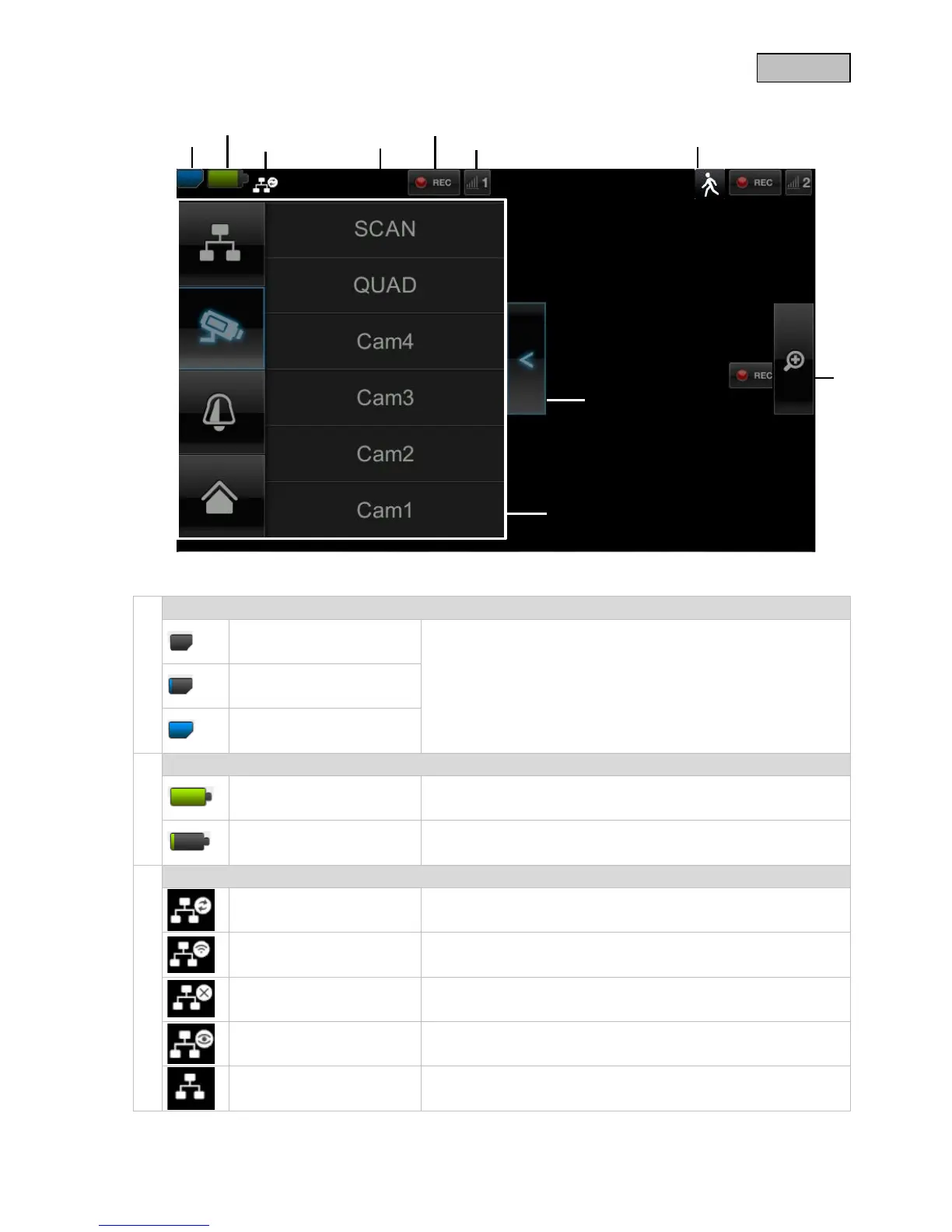
7.2. Live view
Explanation of symbols
SD card display
No SD card
Tip: Always switch off the device before removing the SD card.
SD card detected and
almost empty
SD card full
Battery status display
Battery fully charged The batteries will provide power for approx. 1.5 hours.
Low battery
Charge the monitor battery as soon as the symbol appears and
flashes.
Internet connection status
Connection is being
established
A connection to the network is being established.
Connection established
successfully
A connection to the network has been established.
Disconnected The network connection has been disconnected.
Remote access active This symbol appears if the live image is accessed via the app.
Intranet
This symbol appears if your monitor is connected to the network
but no internet access is required.
49

Table of Contents

Related product manuals