23
6.6 Description of the function buttons
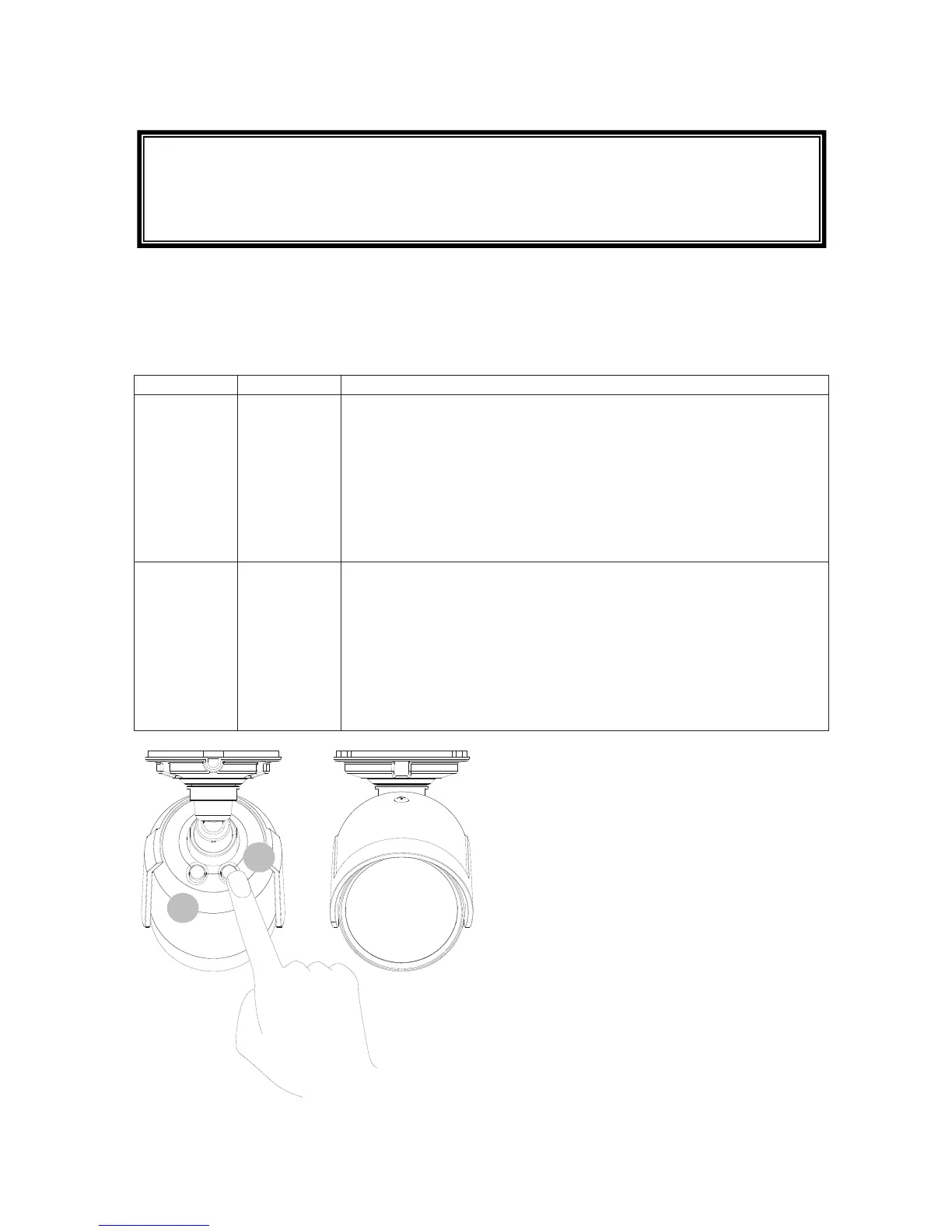
Use the function buttons at the back to adjust the WDR performance and IR-LED intensity. Press
the appropriate buttons repeatedly to select different levels.
The buttons are operated as follows:
Button Function Operation
Left (7) WDR
adjustment
4 levels are available:
1x: WDR active / sharpness high
2x: WDR active / sharpness low
3x: WDR deactivated / sharpness high
4x: WDR deactivated / sharpness low
The selected setting will appear in the video image for approx. 2
seconds. The status LED at the front of the camera will flash to
confirm the selected level.
Right (8) IR LED
intensity
4 levels are available:
1x: IR LED 50%
2x: IR LED 75%
3x: IR LED 100%
4x: IR deactivated
The selected setting will appear in the video image for approx. 2
seconds. The status LED at the front of the camera will flash to
confirm the selected level.
8
7
The key lock is activated approx. 10 minutes after button 7/8 was last used
To deactivate the key lock, press and hold a button for about 5 seconds. Once you
have deactivated the key lock, the blue LED at the front of the camera will flash 5
times.



 To Next Page