20
English
5.2 Aligning the camera
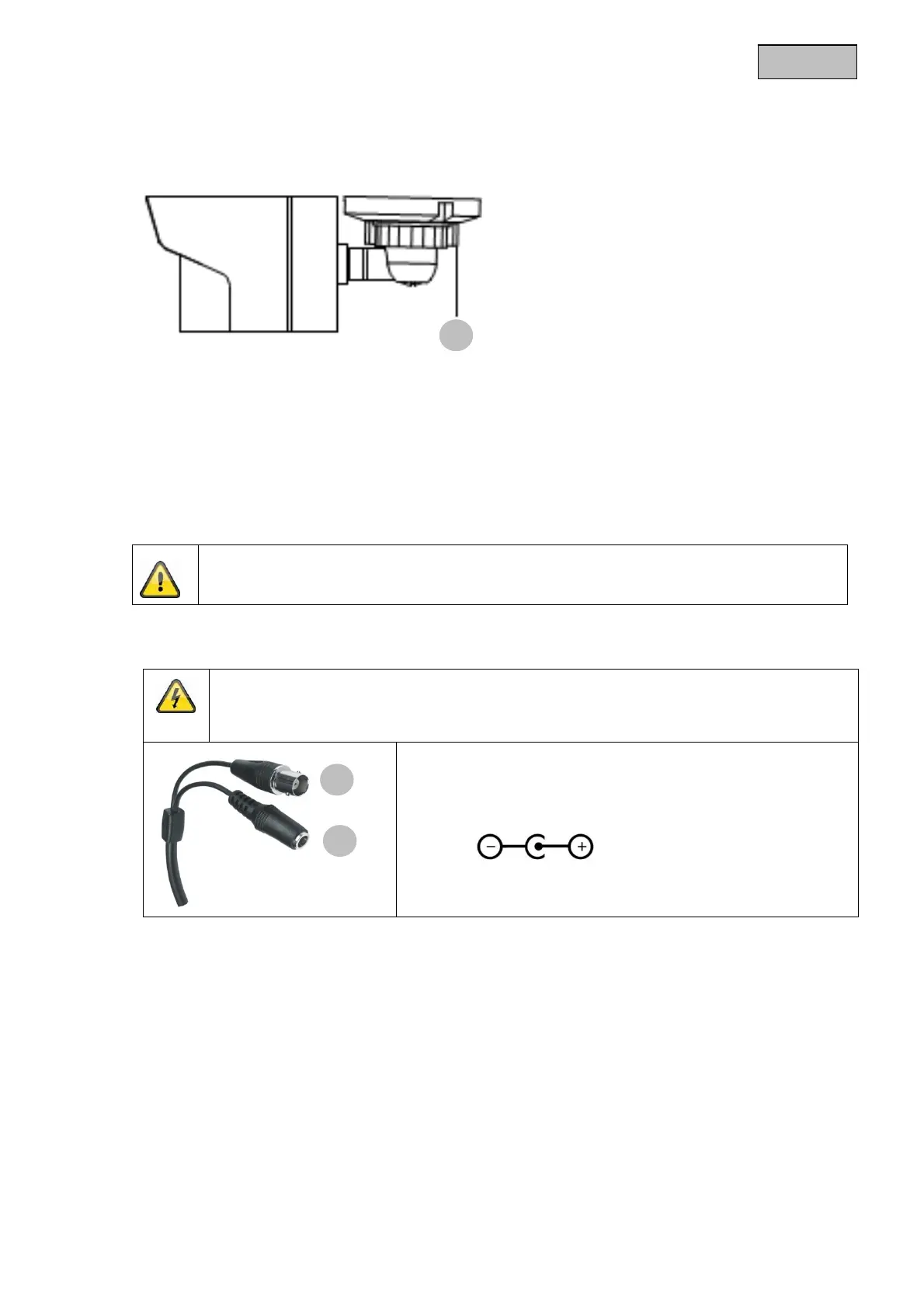
The camera can be aligned in 3 axes.
Rotation: 0°–360°;
Loosen the rotary knob (1) in order to adjust the angle of rotation.
Tilt: 0°–90°
Loosen the rotary knob (1) in order to adjust the inclination.
Pan: 0°–360°
Loosen the rotary knob (1) in order to adjust the angle of view.
Do not forget to resecure the rotary knob!
5.3 Power supply
IMPORTANT!
Before starting installation, ensure that the power supply system voltage and the rated
voltage of the camera are identical.
(1) Video signal (BNC)
(2) Power supply
12 V DC (5.5 x 2.1 mm)
The cameras have a 12 V DC power supply. Ensure correct polarity when connecting. A plug-in power
supply unit (round plug, 5.5 mm x 2.1 mm) is provided for the connection.
5.4 Installing the video cable
In order to transmit the video signal from the HD-SDI camera to an HD-SDI converter, monitor or
recorder, an RG6 or RG59 coaxial cable with a BNC plug (male) must be connected to the video output.
The cable length to the next device may not exceed 80 meters (RG59) or 150 meters (RG6). To increase
the range, you can install suitable signal HD-SDI repeaters.
1
2
1


 To Next Page