16
PROGRAMMING
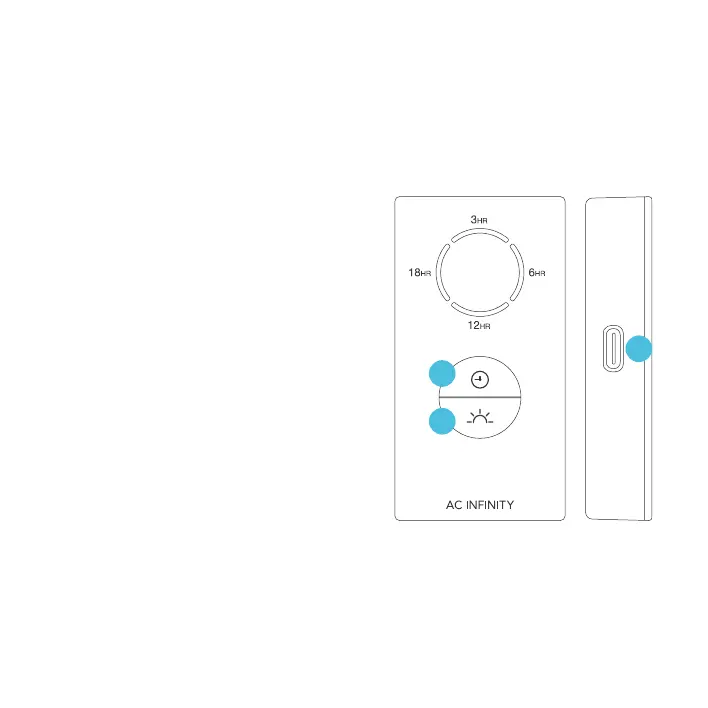
1. LIGHTING
Pressing the light button will increase the light
intensity level in 10/30/60/100% increments,
displayed with white LED indicators. Pressing
this button at 100% intensity will cycle to 0%.
Holding the light button will shut off the lighting.
Pressing it again will return the light intensity to
its previous setting.
2. TIMER
Pressing the clock button will set the timer
in 3/6/12/18-hour increments, displayed with
orange LED indicators.
Within a 24-hour cycle, lighting will be active for
the amount of time set here (ex. 3 hours for a
3HR timer). It will deactivate for the rest of the
24-hour cycle (ex. 21 hours).
Pressing the clock button at the 18HR setting
will deactivate the timer, cycling from 3HR
onwards when pressing this button again.
3. UIS CONNECTION
Refer to the programming section of your selected
UIS controller for programming instructions.
2
1
3


 To Next Page