16
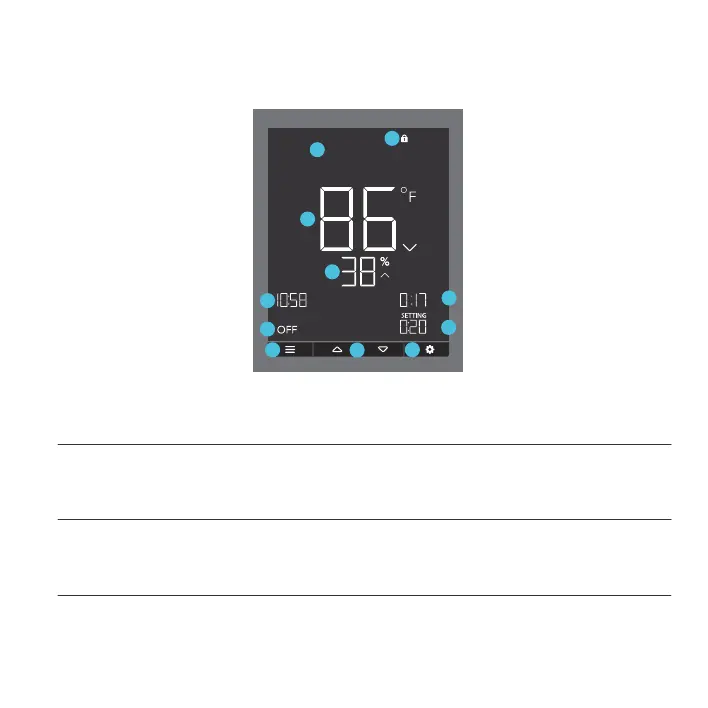
1. MODE BUTTON
This button cycles through each of the controller’s mode: OFF, ON, AUTO (4 triggers), TIMER TO
ON, TIMER TO OFF, CYCLE (On and Off), and SCHEDULE (On and Off).
3. SETTING BUTTON
This button cycles through each of the controller’s settings: DISPLAY BRIGHTNESS, F/C, CLOCK,
CALIBRATION (Temperature and Humidity), and BUFFER (Temperature and Humidity).
2. UP / DOWN BUTTON
Adjusts the parameters of the mode that you are in. In most modes, the up button increases and
down button decreases the setting. Holding both buttons simultaneously sets the parameters to off.
PROGRAMMING
4. OUTLET STATUS
Displays the outlet controller’s power status, indicating whether or not electricity is being fed to your
device. ON will display if your device is being powered and OFF will display if your device is not
being powered.
ON
TO
ON
TIMER TO
PM
1
2
3
5
6
7
8
9
10
4
11


 To Next Page