1
1 WIRELESS REMOTE CONTROLLER
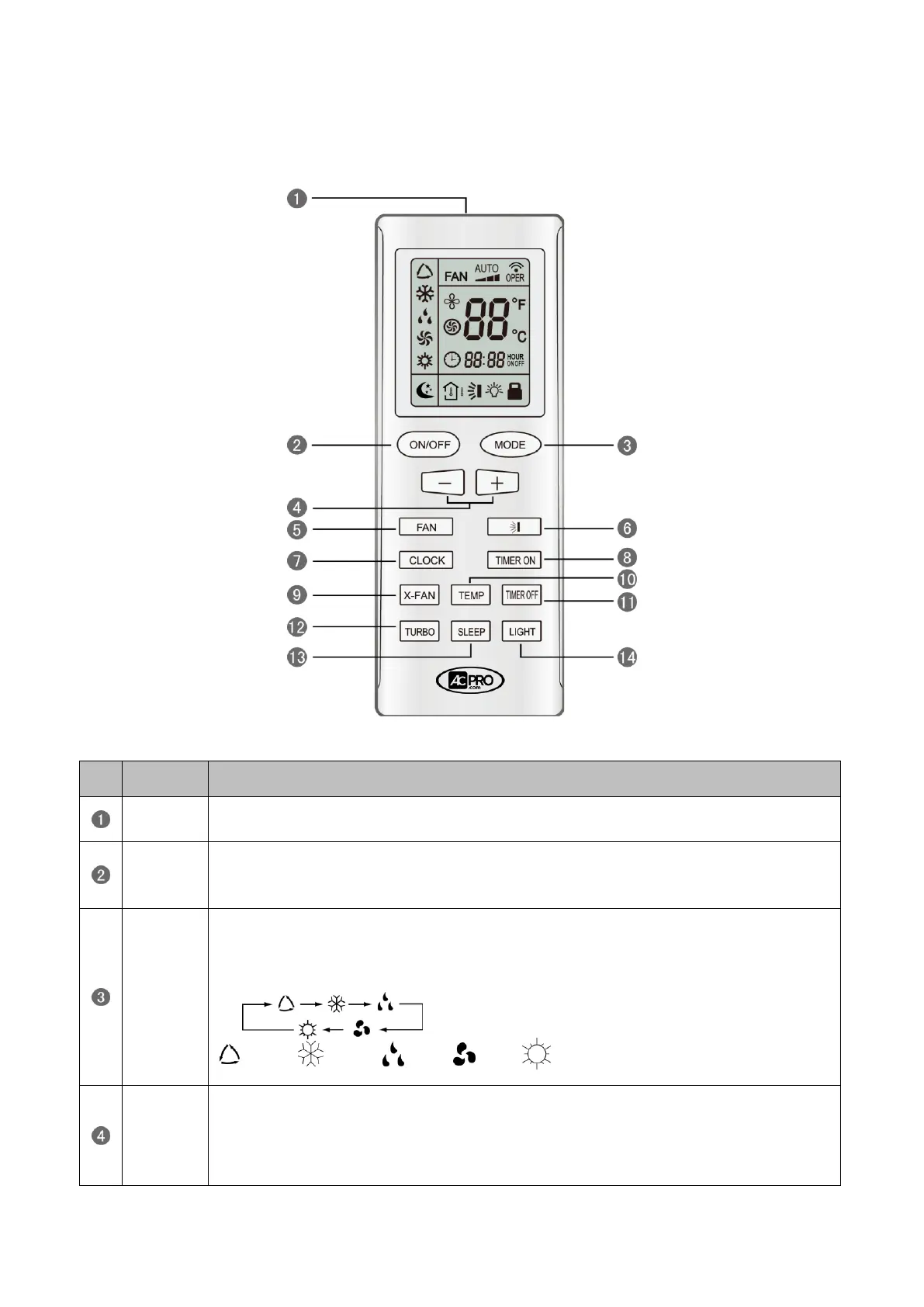
1.1 Operation and Display View
Operation instruction of wireless remote controller
Press this button and the unit will be turned on; press it once more, and the unit will be turned
off. When turning off the unit, the Sleep function will be canceled, but the presetting time is still
remained.
By pressing this button, Auto, Cool, Dry, Fan, Heat mode can be selected circularly. Auto
mode is default after power on. Under the Auto mode, the setting temperature will not be
displayed; Under the Heat mode, the initial value is 28°C (82°F);Under other modes, the initial
value is 25°C(77°F).
AUTO; COOL; DRY; FAN; HEAT (only for cooling and heating unit)
Preset temperature can be decreased by pressing this button. Pressing and holding this button
for more than 2 seconds can make the temperature changed quickly until release this button
and then transmit this order. The temperature adjustment is unavailable under the Auto mode,
but the order can be sent by pressing this button. Centigrade setting range: 16-30; Fahrenheit
scale setting range 61-86.




 To Next Page