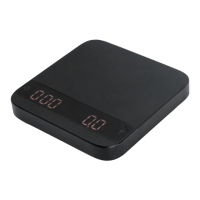
In the Weighing Mode, the scale will only display
weight, in either grams or ounces.
In the Dual Display Mode, the scale displays [ 0:00 0.00 ]
with a timer (left) and weight (right).
• There are two different weighing units in the Weighing Mode: gram and ounce.
• The LED display shows [ 0.00 ] when the scale is measuring in grams.
• The LED display shows [ 0.0000 ] when the scale is measuring in ounces.
• There are two different weighing units in the Dual Display Mode: gram and ounce.
• When the scale is measuring in grams, the LED display shows [ 0:00 0.00 ].
• When the scale is measuring in ounces, the LED display shows [ 0:00 0.000 ].
• If the weight exceeds 500.00 grams, the scale will display [ _ _ _ _ ].
• The maximum time that can be displayed is 9 minutes and 59 seconds. When the
limit is reached, the timer still goes up to until 999 minutes and 59 seconds. It can be
observed through our iOS/Android App.
Mode Introduction
Mode 1 - Weighing Mode
Mode 2 - Dual Display Mode
Action Operation
Tare
Tap Tare button
Toggle Units g/oz
Long press Tare button
Switch Modes
Long press Power button
Action Operation
Start/Stop/Reset Timer
Tap Power button
Tare Operation
Tap Tare button
Switch Mode
Press and hold Power button
Toggle Units g/oz
Press and hold Tare Button
6
*To change the default weighing unit to either gram or ounce, please see Default Unit Setting
in the Conguration section (p. 8).


 To Next Page