www.acasis.com
3
Off-line Disk Cloning Instruction
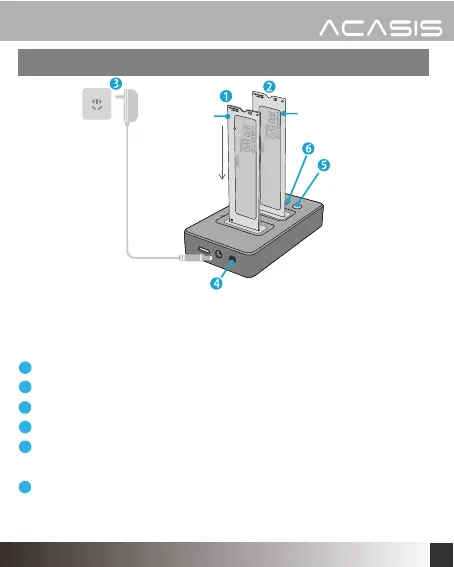
Insert your source SSD in SLOT A
Insert your target SSD in SLOT B
Connect the power adapter to the enclosure.
Press the power button.
Press and hold down the clone button for 3 seconds until the
LED indicator begins to flash.
The LED indicators show the cloning progess.When all four LEDs
stops flashing, the cloning process is finished. This process may
take a long time which mainly depends on the capacity of SSD.
1
2
3
4
5
6
Before cloning, disconnect the USB cable from the enclosure.
Comfirm that the capacity of target SSD is equal or greater than
the source SSD, otherwise the cloning function will not work.
source
Target


 To Next Page