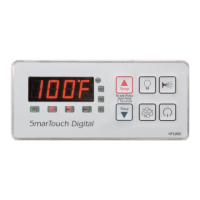
Example: program filtration period 2 to start at 5:45 PM
Press Display Explanation
SET & UP FP1 Start programming the display first message
is Filtration Period 1.
UP FP2 Scroll up to Filtration Period 2.
SET 12:00 Select FP2. The display shows the current
FP2 start time with the hour portion flashing
UP 1:00 Increase the hour value by 1.
UP 5:00 Press UP key 4 more times or press and
hold for auto repeat.
SET 5:00 The hour is set, the minute portion flashes.
DOWN 5:45 Press UP 15 times or press and hold for auto
repeat.
SET FP2 FP2 set to 5:45 PM & the current message is
displayed again.
DOWN FP1 Scroll to previous message.
DOWN CANC Previous message - if you press SET when
CANC is displayed all changes will be
discarded
DOWN SEND Previous - save changes
SET Temp Changes saved.
Exit programming mode.
Display current spa temperature, time or
operating message.
The table on the following pages is a list of all menu items, their
minimum, default and maximum values and an explanation of the
function of each parameter.
Note : Time parameters have two components, the hours and the
minutes. When programming a time element, first the hour portion is
programmed (flashing). When the hours are set press the SET key to
program the minutes portion.


 To Next Page