Msg Min Def Max Detail
CLDN 30 60 180 Cool Down cycle in seconds. Whenever
the heater is turned off the pump keeps
running the extra seconds to even the
temperature of the heater element and
the surrounding water to prevent scale
build up and premature heater failure.
ECL 60 180 240 Economy Cycle Length. Time in minutes
to specify the intervals between spa
temperature sampling when the spa is
not in use. During this period the spa is
in economy mode. Temperature is
sampled at the end of the period. Press
any key to cancel this mode.
NOTE: In severe cold weather
conditions set ECL to 60 minutes.
CHCL 0 60 180 Channel Clear. Time in seconds to clear
the air channel and the secondary
pump(s) plumbing if the spa has not
been used for a period of 24 hours. This
prevents water stagnation in the
plumbing.
UTO 10 20 60 User Time Out. The time in minutes from
starting any device, after which all
devices will be turned off, and the spa
put in “not in use mode”. If you should
leave the spa with a pump or light
running, it will be turned off after the
specified time.
PUF 30 60 180 Post Use Filtration. Time in minutes to
perform Post Use Filtration this is the
optimal time to filter the spa. When you
have finished using the spa, that is when
it needs filtration the most. Press the
SET key to turn off all functions and start
filtering.. This cycle is performed only
once and after pressing the SET key. It is
in addition to the standard filtration
cycles. Pressing any other device key
will cancel this function.
P R O GR A M M IN G
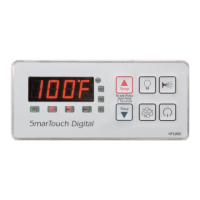
SmartTouch Digital comes with factory settings. Programming the
SmartTouch controller is optional. The following options are nec-
essary only if you have certain requirements or you need to in-
crease the filtration and heating cycles.
Parameter Programming is a means by which the spa owner
/ user can change the various timing elements and calibrate tem-
perature. The process is simple and intuitive. Only 3 keys are
used: UP, DOWN, and SET. To program one or more parameters
follow the outlined this procedure:
1. Press SET and DOWN keys together. The first message
in the menu, FP1 will be displayed.
2. Use the UP & DOWN keys to scroll thru the messages
in the menu.
3. Press the SET key to display the current value
associated with the current message.
4. Use UP or DOWN keys to increase or decrease the value.
5. Press SET to lock in the new value and return to menu.
6. If another item needs programming go to number 2 above.
7. To Save changes scroll to message SEND and press SET.
8. To discard changes and restore previous values scroll
to message CANC and press SET.
The menu of the parameters is circular. Scrolling is from first to
last or from last to first.
When in programming mode please note that this mode will be
cancelled if there is no key activity for a period of 60 consecutive
seconds. Programming mode is aborted and all changes will be
restored to previous values.
On the following page is an example of how to program a filtra-
tion period. When in programming mode you may program as
many parameters as needed.
Page 15
Page 12


 To Next Page