Instruction
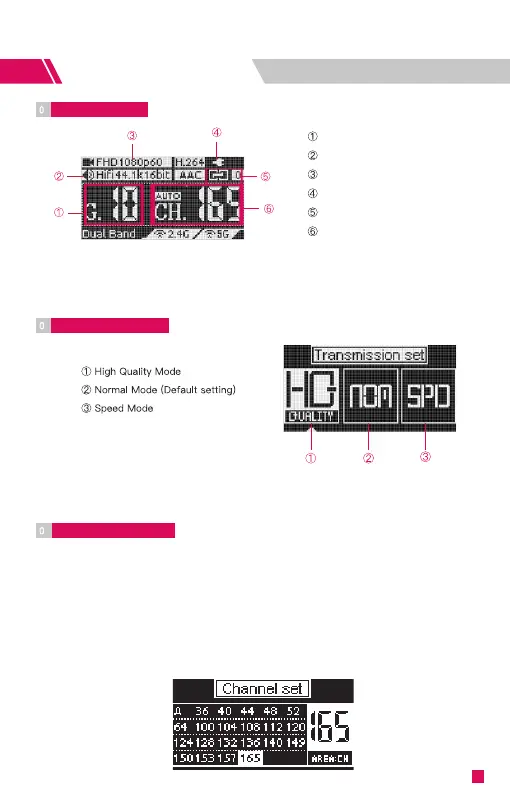
OLED Display
4
Input video information
Input audio information
Battery level/DC input
Connection status
Current group
Data Rate Setting
5
Connection Status:
Transmitter: the number of connected devices; “0" if none connected.
Receiver: “1" when connected to the transmitter; otherwise “0".
How to:
Press the menu button to access “Data Rate Setting" → Press the left and
right buttons to select → Press the menu button to activate the setting.
Channel Setting
6
1. Only the transmitter has the “Channel Setting" menu.
2. The default channel setting is Auto (A). CineView HE will automatically
select the channel with the least interference when it is powered on.
(Note: It is recommended that users do not change this setting.)
3. If the user needs to change the channel, please: Press the menu button
to enter “Channel Setting" → Press the left and right buttons to select →
Press the menu button to confirm → Select “Yes" → Press the menu
button to confirm and the setting will take effect after reboot.
6
Current channel


 To Next Page