8 9
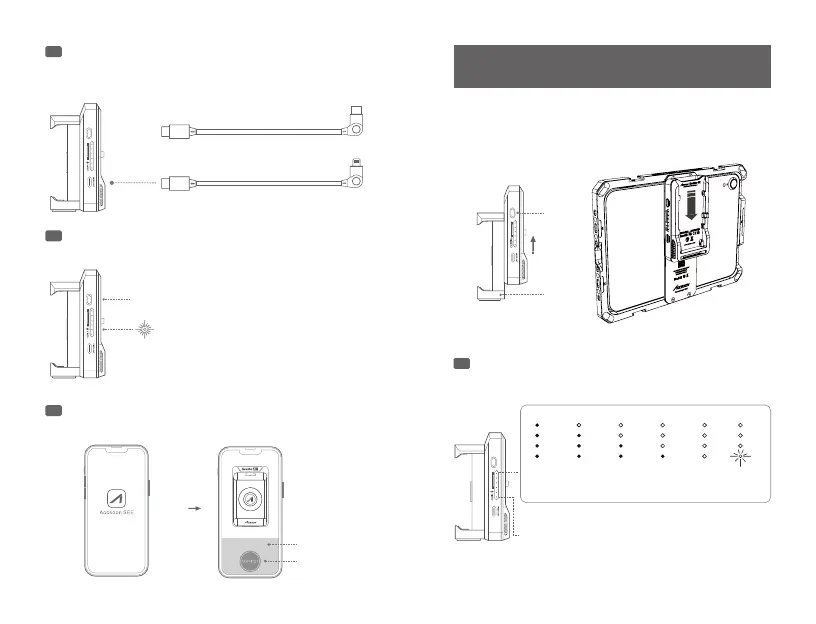
Connect your iPhone/iPad to the Accsoon SeeMo 4K’s
USB-C video output port using the corresponding cable.
Power On/O
Open the Accsoon SEE App, select “Accsoon
SeeMo", and tap “MONITOR" to start monitoring.
7
8
9
Hold the two parts with both hands and separate the part
A and the part B as shown in the picture. Then slide and
lock down the part A to the Accsoon iPad PowerCage.
Status indicator
HDMI indicator
on-Valid video input is detected
o-No valid video input
10
Attach the Accsoon SeeMo 4K to the Accsoon
iPad PowerCage (optional product).
Power level indicator
>75%
50%~75%
25%~50% 0%~25%0 %
闪烁:
电量不足
Power O:
Hold the power button for 2 seconds.
Power On: Press the power button and
the power indicator LED will turn on.
iPhone/iPad (USB-C port):
iPhone/iPad (Lightning port):
Use USB-C to USB-C cable
Use USB-C to Lightning cable
0%~
Flash:
power level low
A
B
SeeMo
Select
Tap



 To Next Page