Instruction
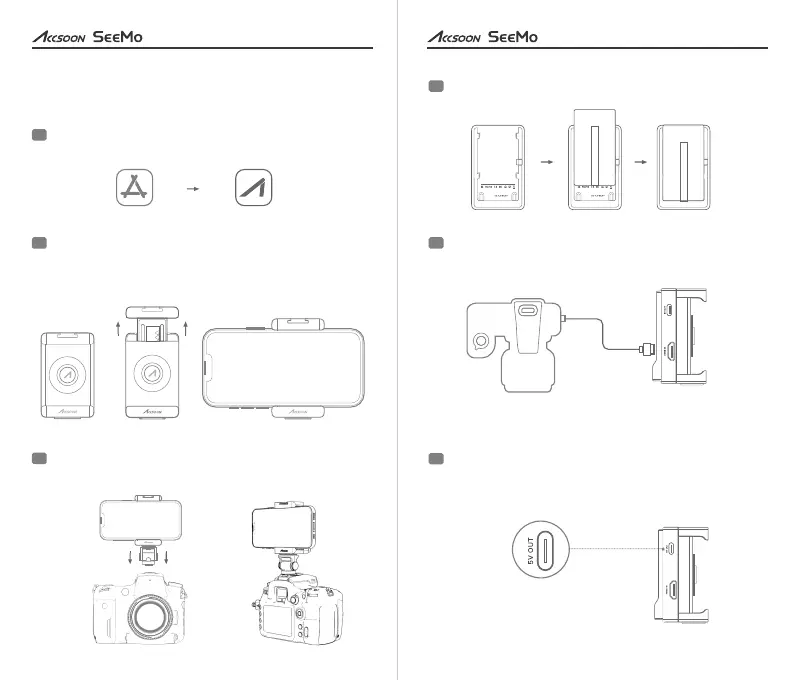
Download and install the Accsoon SEE App on your iPhone or
iPad.
1
Extend the Accsoon SeeMo to attach the iPhone (avoiding the
buttons on the side of the phone). To use with iPads, an
Accsoon iPad Cage is required (optional product).
2
Mount the Accsoon SeeMo via the cold shoe adapter and
make sure it’s held securely.
3
Attach an NP-F series battery.
4
MODEL :UIT0 2
HDMI To U SB On-C amera D evice
Acc soon Se eMo
MODEL :UIT0 2
HDMI To U SB On-C amera D evice
Acc soon Se eMo
MODEL :UIT0 2
HDMI To U SB On-C amera D evice
Acc soon Se eMo
Connect the Accsoon SeeMo to the camera using HDMI cable
(optional product).
5
If there is a need to power other devices (e.g. Accsoon F-
C01), connect the cable to the USB-C power output port.
6
4
User Manual
3
User Manual
Accsoon SEEApp Store


 To Next Page