9
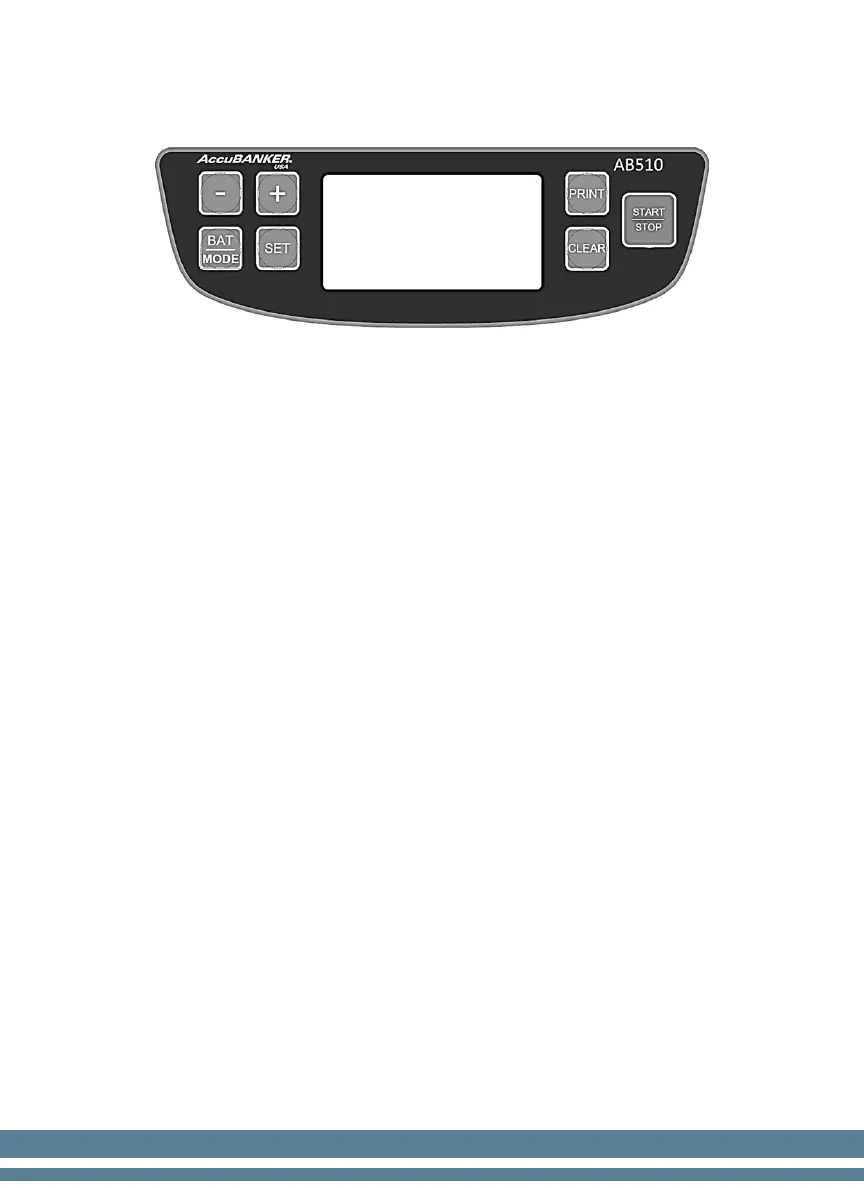
4. Control Panel Description
"-'' key
At the SET mode, short press this key, the number decreases by 1 unit.
At the SET mode, long press this key, the number decreases continuously 1
unit.
At the counting mode, press this key to choose down the counting result
which needs to clear.
"+" key
At the SET mode, short press this key, the number increases by 1 unit.
At the SET mode, long press this key, the number increases continuously 1
unit.
At the counting mode, press this key to choose up the counting result which
needs to clear.
''BAT/MODE" key
Long press this key to choose the batching mode between "TRAY" and
"ROLL"
Short press this key, the batch number increases by 10 units and 20 units.
When it is in SET mode, long press this key, and the batch number increases
continuously in steps of 10 units and 20 units.
"SET" key
Press this key to enter SET mode.
Continue to press this key to scroll through options.


 To Next Page