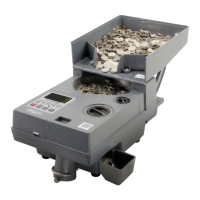
The AccuBANKER AB510 is a versatile coin counter designed for efficient cash handling, specifically for counting, sorting, and rolling large volumes of coins. It is engineered with heavy-duty mechanical components to meet the demands of users who process high quantities of coins regularly.
Function Description
The primary function of the AB510 is to accurately count and sort mixed denominations of coins. It offers two main operational modes: "TRAY" mode for general counting and sorting into coin drawers, and "ROLL" mode for packaging coins into paper rolls. This dual functionality makes it suitable for various environments, from small businesses to larger operations that require coin preparation for banking.
The device features a hopper where mixed coins are deposited. Once initiated, the machine automatically sorts the coins into designated drawers or directs them into coin roll tubes based on the selected mode. The AB510 is designed to handle multiple denominations simultaneously, streamlining the coin processing workflow.
Usage Features
Control Panel and Display: The AB510 is equipped with an intuitive control panel and an LCD display, making it easy for users to navigate its functions. The control panel includes several keys:
- "-" and "+" keys: These are used in "SET" mode to decrease or increase numerical values (e.g., batch numbers) by 1 unit. In counting mode, they help select specific counting results to clear. Long presses allow for continuous adjustment.
- "BAT/MODE" key: A long press of this key allows the user to switch between "TRAY" and "ROLL" batching modes. A short press increases the batch number by 10 or 20 units. When in "SET" mode, a long press continuously increases the batch number in steps of 10 or 20.
- "SET" key: This key is used to enter the "SET" mode and to scroll through various options within the batch menu, allowing users to modify desired denominations.
- "PRINT" key: A long press of this key will print a receipt detailing the counting results, providing a record of transactions.
- "CLEAR" key: A short press removes an individual set value or clears a flashing individual counting result. A long press clears all set values or all counting results.
- "START/STOP" key: This key initiates or halts the counting process.
Coin Sorting Operation:
- Setup: Connect the unit to a power outlet and turn it on.
- Mode Selection: Choose between "TRAY" mode for sorting into coin drawers or "ROLL" mode for preparing coin rolls. "TRAY" mode is ideal for general counting and sorting, while "ROLL" mode is specifically for packaging coins.
- Coin Drawers (TRAY mode): If "TRAY" mode is selected, ensure the coin drawers are in place to collect sorted coins by denomination.
- Deposit Coins: Place all mixed coins into the Coin Hopper.
- Start Counting: Press "START" to begin the coin counting process.
- Automatic Stop: The unit will automatically pause when a coin drawer reaches its maximum capacity. The user should then empty the full drawer and press "START" again to resume counting.
Coin Rolling Operation:
- Deposit Coins: Place coins into the Coin Hopper.
- Tube and Roll Placement: Select the appropriate coin roll tubes and paper coin rolls for each denomination.
- Insert Rolls: Insert the paper coin rolls inside the coin roll tubes and position them correctly within their respective denomination sections on the machine.
- Start Rolling: Press "START/STOP" to begin the coin rolling process.
- Automatic Stop and Continue: The machine will automatically stop once a paper coin roll is filled. Remove the filled roll, position a new paper coin roll, and press "START" to continue.
Batching Example: The unit comes with default maximum coin quantities for each denomination per tray and roll, which may vary based on the programmed currency. The LCD display shows the current mode (e.g., TRAY), currency (e.g., USD), denomination (e.g., 0.01, 0.05), and batch quantity (e.g., 300, 400). Users can modify these batch values:
- Press "BAT/MODE" to select the sorting mode.
- Press "SET" to enter the batch menu, then press "SET" again to choose the denomination to modify.
- Press "CLEAR" to clear the current batch value.
- Press "BAT/MODE" to increase the batch value by 10 or 20 units.
- Use "+" and "-" to increase or decrease the batch value by 1 unit.
- Press "START/STOP" to confirm the selected batch.
Maintenance Features
Daily Maintenance: Regular maintenance is crucial for optimal performance and longevity of the AB510.
- Power Off: Always turn off the power switch after the last count is completed.
- Cleaning: Clean the Hopper coin plate and the coin track using a brush and an air duster. This helps prevent debris buildup that could affect counting accuracy or cause jams.
- Technical Support: If the unit exhibits unusual performance or technical problems, users are advised to contact their local dealer for technical support.
Jamming Resolution: The AB510 is designed to minimize jamming. However, if a jam occurs, the machine will automatically stop counting, and the turning plate will reverse direction to attempt to clear the jammed object.
To prevent jamming, users should avoid:
- Counting bent or damaged coins or tokens.
- Counting foreign objects such as clips, staples, paper, nylon, or rubber bands.
If the unit cannot clear a jam automatically:
- Power Disconnection: Turn off the power switch and unplug the unit from the power outlet.
- Access Service Window: Open the service window located on the back of the unit to access the coins plate.
- Clear Obstruction: Inspect the coins plate and carefully remove any obstructions.
- Restore: Close the service window.
- Reconnect Power: Plug the unit back into the power outlet and turn on the power switch.
- Verify Functionality: Confirm that the unit is now working correctly.
- Contact Support: If the issue persists, contact a technical support agent for further assistance.
Error Code Messages: The AB510 provides error codes to help diagnose issues:
- E1-E8 (Counting sensor error): This indicates a dusty or damaged counting sensor. The solution is to clean the sensor or contact support if damaged.
- E9 (Detecting sensor error or machine has a coin jam): This suggests a coin jam or a detecting sensor error. The solution is to remove the jammed coin; if the problem persists, contact support.
- E10 (Motor detecting sensor error): This points to a damaged code sensor or motor. The solution is to contact support.
These features ensure that the AccuBANKER AB510 is not only an efficient coin processing tool but also user-friendly and relatively easy to maintain, with clear guidance for troubleshooting common issues.

 Need help?
 General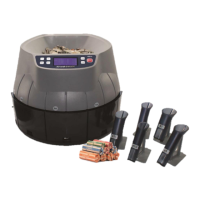

 To Next Page