EasyManua.ls Logo

Acculab POCKET PRO PP-250B - User Manual

Acculab POCKET PRO PP-250B
2 pages
Print Icon
To Next Page IconTo Next Page
Loading...
Model PP-250B
Instruction
Manual
P
L
E
A
S
E
R
E
A
D
C
O
M
P
L
E
T
E
I
N
S
T
R
U
C
T
I
O
N
S
B
E
F
O
R
E
U
S
E
K
E
Y
P
A
D
F
U
N
C
T
I
O
N
S
C
A
L
/
M
O
D
E
:
Press and hold this key to begin calibration proce-
dure as outlined under the CALIBRATION section. After unit is on or
calibrated, press and release the Cal/Mode key will change the weigh-
ing mode. When balance is turned on the unit initially defaults to the
gram (g) mode. The following modes may also be selected: ounces
(oz), penny weight (dwt), troy ounces (ozt).
O
N
/
M
E
M
O
R
Y
:
Press and release to turn on balance. Once the unit
is on, the same key operates the additive memory feature. The follow-
ing steps outline the procedure for cumulative weighing of samples.
1) If needed, place container on weighing pan, wait for stable reading,
then press and release "tare" to return balance to zero and permanent-
ly remove container weight from the additive procedure.
2) Add first sample until desired weight is achieved.
3) Press and release "memory" to reset unit to zero. The memory
symbol (up arrow) appears in the upper left corner, indicating the
previous weight value has been stored.
4) Add second sample until desired weight is achieved.
5) Press and release "memory" again. The (up arrow) symbol will
disappear and the display will show the combined weight of the first
and second samples. Repeat steps 3 through 5 for additional items.
NOTE: When the entire load is removed from the balance, the display
will show a negative value equal to the tared value of the container if
used. To reset the balance to zero, press and release the tare key.
T
A
R
E
:
Press and release tare to reset the balance to zero. Tare
can be used to eliminate the weight value of a container from a sample
or procedure. The container weight is permanently removed from the
remainder of the procedure.
NOTE: When all weight is removed from the weighing pan, the tared
value of a container will be displayed as a negative number. Press and
release tare again to return the balance to zero.
O
FF
:
Press and release to turn off balance. The off key is also used
to perform the calibration procedure as outlined under calibration.
Calibration Weight: OIML Class M2
Pocket Pro
R
250B (1) 200g calibration weight
9V Alkaline Battery
Carry Pouch
R
R
M
o
d
e
l
s
Capacity (g) 250g
Readability 0.1 g/0.01 oz/0.1 dwt/0.01ozt
Repeatability (g) ±0.1
Weighing Modes g, oz, dwt, ozt
Tare Range To capacity by subtraction
Calibration External calibration from keypad
Stabilization Time (sec) 3
Maximum Overload 150% of capacity
Overload Indication "E" with audio tone
Underload Indication Negative value
Auto Off 4 minutes no activity
Optimum Operating Temperature 64˚û - 77˚û F (18-25 C)
Optimum Operating Humidity Less than 80% RH
Display Type LCD/ with power up segment test
Audio Tone Start up, function keys, overload, low battery
Low Battery Indication "LO" w/10 beep signal
Power Requirements 9V alkaline battery only
Platform Size/Type 3" x 3.25" plastic (75 x 85mm)
Dimensions HxWxD 1" x 3" x 4.75" (25 x 75 x 120mm)
Net Weight (lb/kg) 1/0.5
Included Accessories (1) 200g calibration weight
9V alkaline battery & carry pouch
Optional Accessories None
Performance specifications measured within optimum temperature range after recom-
mended warm up and proper calibration. Specifications subject to change without notice.
S
p
e
c
i
f
i
c
a
t
i
o
n
s
P
h
o
n
e
:
800-656-4400
631-254-4299
F
ax
:
800-356-0338
631-253-5472
S
a
l
e
s
O
ff
i
ce
:
131 Heartland Blvd.
Edgewood, NY 11717
www.acculab.com
400287.1 Rev. B
ACCULAB
ACCULAB
Limited Warranty
Effective Date: January 1, 2003
Standard Terms and Conditions
Models: Pocket Pro series PP-250B
ACCULAB warrants the product PP-250B against defects in material and
workmanship to the original consumer for a peroid of twelve (12) months
or a maximum of fifteen (15) months from date of sale to authorized
ACCULAB distributor. The warranty includes parts, labor and return
shipping charges to customer (ground freight).
This specific warranty shall not apply to any product damaged due to accident,
misuse, abuse, lightning strike, power surges, improper packaging for shipment to
ACCULAB, or service/modification by anyone other than an authorized ACCULAB
Technician.
The purchaser's sole remedy, ACCULAB and its suppliers sole liability are set forth
herein. In no event shall ACCULAB or its suppliers be liable for any damages,
incidental or consequential, expenses, lost profits, lost savings, or any other claims
due to the use or inability to use the product/s. ACCULAB shall limit its obligations
under warranty to a time not to exceed the original product warranty period set
forth herein. This warranty gives you specific legal rights and you may have other
rights, which may be different from state to state.
In the event that service is required, the Customer/Distributor should call
ACCULAB (800-656-4400, extension 8342) for proper return authorization. The
product must be delivered to ACCULAB, Service Division 6542 Fig Street, Arvada,
CO., 80004 within the warranty period, freight charges prepaid. The customer is
responsible for product removal, installation and proper packing in order to
prevent damage while shipping to ACCULAB Service facility.
This limited warranty supersedes all other warranties pertaining to the ACCULAB
products, whether expressed or implied. Claims may be made by calling 800-656-
4400/631-254-4299, by fax 800-356-0338/631-253-5472, or in writing to:
Attn: Warranty Administrator
6542 Fig Street
Arvada, CO., 80004
(800-656-4400)
SUPPLIED ACCESSORIES:
PP-250B

Question and Answer IconNeed help?

Do you have a question about the Acculab POCKET PRO PP-250B and is the answer not in the manual?

Summary

Keypad Functions

Cal;Mode Key

Initiates calibration or switches weighing modes (grams, ounces, pennyweight, troy ounces).

On;Memory Key

Turns the balance on and operates the additive memory feature for cumulative weighing.

Tare Key

Resets the balance to zero, used to exclude container weight from sample measurements.

Off Key

Turns the balance off and is also used for the calibration procedure.

Operation and Calibration

Battery Operation

Details on installing and handling the required 9V alkaline battery for balance power.

Calibration Procedure

Step-by-step guide for performing external calibration using keypad and calibration weight.

Power Up Segment Test

Describes the display test performed when the unit is first powered on.

Stable Reading Indication

Explains the arrow indicator for stable weighing mode confirmation.

Audio Tone

Confirms key presses emit a tone indicating function registry.

Overload Indication

Details the 'E' indication and beeps when the unit's capacity is exceeded.

Negative Value Display

Describes how tared or memory values appear as negative numbers after weight removal.

Tare Functionality

Explains how the tare feature allows resetting to zero to exclude container weight.

Memory Function

Details the memory feature for storing values and progressively adding them for cumulative weighing.

Auto Off Feature

Describes the automatic shut-off feature that conserves battery power after inactivity.

Overview

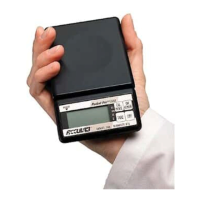
The Acculab Pocket Pro Series Model PP-250B is a compact electronic balance designed for precise weighing. It offers multiple weighing modes and features to enhance usability and accuracy.

Function Description:

The PP-250B functions as a digital scale with a capacity of 250g and a readability of 0.1g. It supports various weighing modes including grams (g), ounces (oz), pennyweight (dwt), and troy ounces (ozt). The device includes a tare function to zero out the weight of containers, an additive memory feature for cumulative weighing of multiple samples, and an auto-off function to conserve battery life. Calibration is performed externally via the keypad using a known weight.

Important Technical Specifications:

  • Capacity: 250g
  • Readability: 0.1g / 0.01oz / 0.1dwt / 0.01ozt
  • Repeatability: ±0.1g
  • Weighing Modes: g, oz, dwt, ozt
  • Tare Range: To capacity by subtraction
  • Calibration: External calibration from keypad
  • Stabilization Time: 3 seconds
  • Maximum Overload: 150% of capacity
  • Overload Indication: "E" with audio tone
  • Underload Indication: Negative value
  • Auto Off: 4 minutes of no activity
  • Optimum Operating Temperature: 64°-77° F (18-25° C)
  • Optimum Operating Humidity: Less than 80% RH
  • Display Type: LCD with power-up segment test
  • Audio Tone: Start-up, function keys, overload, low battery
  • Low Battery Indication: "LO" with 10 beep signal
  • Power Requirements: 9V alkaline battery only
  • Platform Size/Type: 3" x 3.25" plastic (75 x 85mm)
  • Dimensions (HxWxD): 1" x 3" x 4.75" (25 x 75 x 120mm)
  • Net Weight: 1 lb / 0.5 kg
  • Included Accessories: (1) 200g calibration weight, 9V alkaline battery, carry pouch

Usage Features:

  • Keypad Controls: The device features a simple keypad with "CAL/MODE," "ON/MEMORY," "TARE," and "OFF" keys.
    • CAL/MODE: Press and hold to initiate calibration. Press and release to cycle through weighing modes (g, oz, dwt, ozt).
    • ON/MEMORY: Press and release to turn on. Once on, it activates the additive memory feature. The memory symbol (up arrow) indicates a stored weight. Repeated presses accumulate weights.
    • TARE: Press and release to zero the balance, removing the current weight from subsequent measurements. This is useful for containers.
    • OFF: Press and release to turn off. Also used during calibration.
  • Power Up Segment Test: Upon turning on, all display segments illuminate for approximately three seconds before resetting to zero, confirming display functionality.
  • Stable Reading Indication: A right-facing arrow on the display indicates the weighing mode. It disappears during weighing and reappears when a stable value is reached.
  • Audio Tone: A tone sounds when any of the four keys are pressed, confirming function registry. Overload and low battery also trigger audio tones.
  • Overload Indication: If the applied load exceeds capacity, "E" appears on the display with intermittent beeps. The load should be removed immediately.
  • Negative Value Display: Any tared value or a value left in memory will be displayed as a negative number once all weight is removed. Pressing tare returns to normal operation.
  • Auto Off: The balance automatically turns off after approximately four minutes of inactivity to conserve battery power. It will remain on during active loading/unloading of weights exceeding 0.1g.

Maintenance Features:

  • Battery Installation: Requires one 9V alkaline battery. The battery compartment is located on the bottom of the balance. Users should handle lead wires with care and remove the battery when the scale is not in extended use.
  • Calibration: Periodic calibration is recommended for optimal accuracy, especially for prolonged use. The procedure involves pressing and holding "CAL," placing a 200g calibration weight on the pan, and pressing "OFF." An "AL E" message indicates a calibration error, requiring the process to be repeated.
  • Environmental Considerations: The device should be operated within the specified temperature and humidity ranges. It should be kept clean and away from electrostatic fields, gravitational fields, dust, dirt, moisture, vibration, air currents, and other electronic equipment that could affect accuracy.
  • Handling: Items should be gently placed on the center of the weighing pan. Rough treatment can damage the internal sensor.
  • Warranty: The product comes with a twelve-month warranty against defects in material and workmanship, or fifteen months from the date of sale to an authorized distributor. Removal of the factory calibration seal on the right side of the unit will void the warranty. User calibration is performed through keypad operation and does not void the warranty. The warranty excludes damage due to accident, misuse, abuse, lightning strike, power surges, improper packaging for shipment, or unauthorized service/modification.

Acculab POCKET PRO PP-250B Specifications

General IconGeneral
BrandAcculab
ModelPOCKET PRO PP-250B
CategoryScales
LanguageEnglish

Related product manuals