4.4 Installation of Integrated Outdoor Transmitter
The DWS7100 can be used in both the Northern and Southern Hemispheres.
Prior to installation, you will need to calibrate the wind direction as shown below.
Northern Hemispheres (NOR)
The cardinal directions (N, S, E, W) moulded on the body of the outdoor sensor are indicators for the Northern
Hemisphere only.
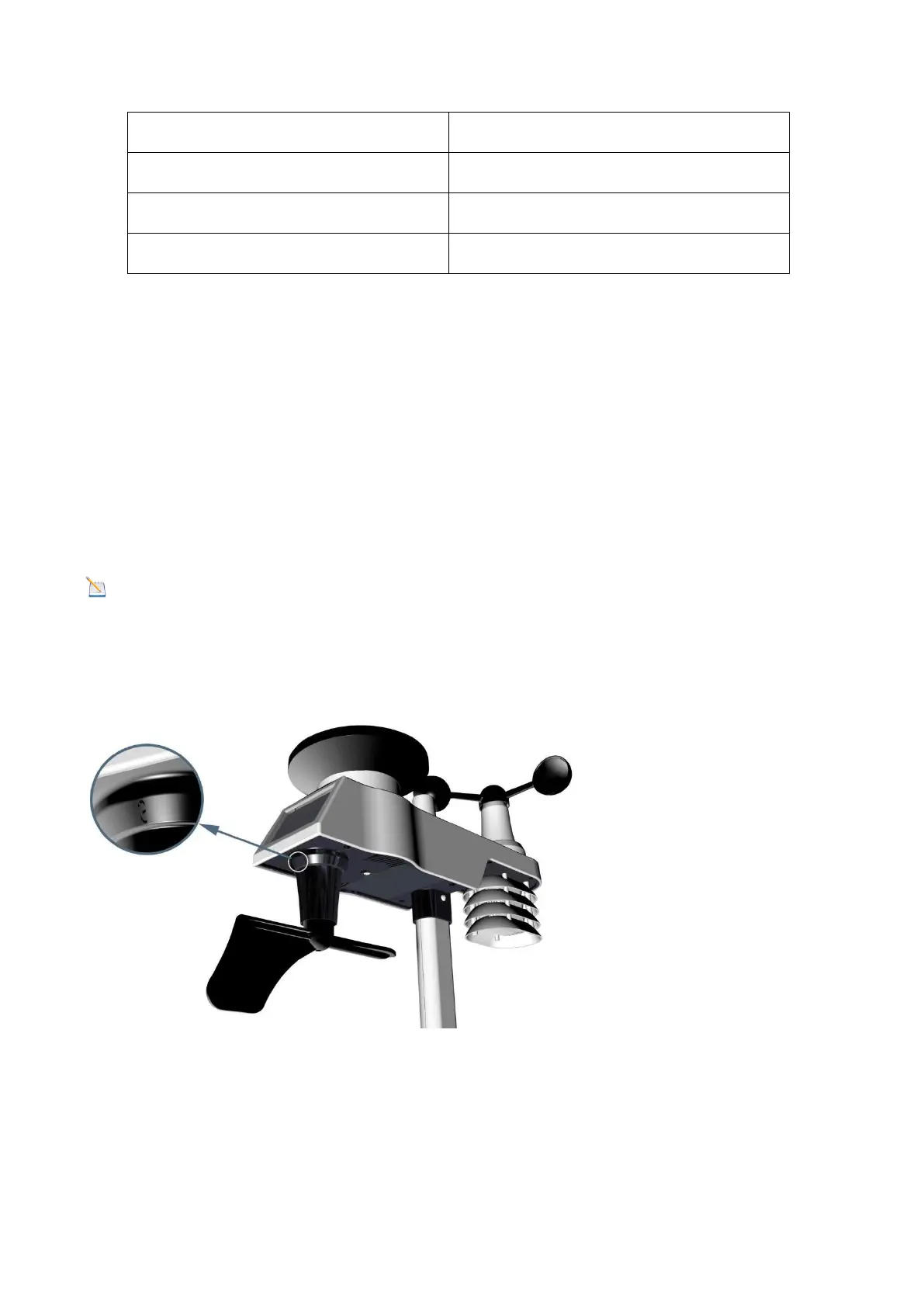
Step 1: There is an “S” indicator on the wind vane that indicates South, as shown in Figure 13. Align this “S”
marker in the direction of South.
Step 2: Console operation is set to Northern Hemispheres (NOR in the time area) in Location division.
Note: There are four letters of “N”, ”E”, ”S” and “W” around the wind direction, representing for the
direction of North, East, South and West. The wind direction sensor has to be adjusted so that the directions
on the sensor are matching with your real location. Permanent wind direction error will be introduced if the
wind direction sensor is not positioned correctly during installation.


 To Next Page