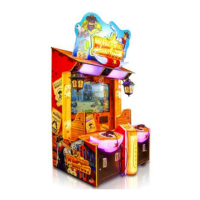
The "Dinosaur Era" is an indoor water shooting redemption machine designed for amusement locations. It offers a novel and beautiful appearance, safe and reliable operation, and is considered a valuable amusement product with a high coin collecting rate.
Function Description:
The primary function of the Dinosaur Era machine is to provide an interactive water shooting game experience. Players use water guns to shoot at targets on the screen, aiming to achieve high scores and earn tickets. The game features multiple scenes and various types of monsters, including bosses, to enhance the challenge and engagement. The machine is designed for indoor use and incorporates a water pump for the shooting mechanism, along with a ticket dispenser for redemption.
Important Technical Specifications:
The Dinosaur Era machine comes in two versions: 75" and 65".
- Operating Voltage: AC 220V - 240V, 50/60 Hz or AC110V±5%, 50/60 Hz.
- Maximum Power: 2000W.
- Dimensions:
- 75" Version: W199 × D245 × H 270 (cm) or W78.3 × D96.5 × H 106.3 (inch).
- 65" Version: W184 × D236 × H 263 (cm) or W72.4 × D93 × H103.5 (inch).
- Weight:
- 75" Version: 1000Kgs.
- 65" Version: 950Kgs.
- Operating Environment:
- Temperature (indoors): 0℃~35℃.
- Humidity: ≤90%.
- Atmospheric Pressure: 86Pa~106Pa.
- Components: The machine includes an industrial computer (mid tower) with A55/5300/memory 2G2 and a 16G hard disk, DDR3 4G memory, R7350 GPU, 2.0-A amplifier board (Y-218B), stereo audio cable (3.5 double RCA 3M2), IO main board (MB-MINI..PCB V1.2), casing line (Zombie Outbreak in Chinese version), USB data cable (Type A/B 1m), upper mist power supply 48V (48V400W), middle solenoid valve power supply 24V (EPT-H150S24), bottom IO board and machine power supply box 12V (SPD-400W), and a solenoid valve high-power driver board (MOS DRIVER.PCB V1.0). Other accessories include cables, fuses, pins for clear water gun's holes, a manual, and keys.
Usage Features:
- Gameplay: The game features 6 scenes (City Street, Mech Factory, Grain Barn, Desert, Town, Park) and offers a variety of monsters, including powerful area damages and bosses, to provide a challenging experience. Players can align with a target, use game props to increase shooting power, and monitor their player status via the UI interface.
- Movement and Positioning: The machine has trundles for short-distance movement. To move, the foot should be raised to allow the trundles to touch the ground. For uneven places or steps, at least 4 people are required to lift the machine for safety. When positioning, the machine should be placed on flat ground and fixed using adjustable feet, ensuring the trundles are approximately 5mm off the ground.
- Safety Warnings: The manual highlights three levels of safety warnings: Danger (harm to people due to improper operation), Warning (possibility of harm to people due to improper operation), and Attention (possibility of harm to people or machine due to improper operation). Specific signs include high temperature warnings and a "no touching" sign.
- Installation Location: Requires a game area of at least 30cm around the machine, with specific dimensions for customer safety and machine operation. The machine should not be placed on inclined surfaces, in high humidity, near high-temperature objects, dangerous substances, or places with heavy vibration or dust. It is strictly for indoor use.
- Power Connection: Connect one end of the cable to the machine's terminal box and the other to a grounded socket. Ensure the power supply matches the voltage specified on the label (220V).
- Game Program Setting: The machine allows for various adjustments through a menu accessed via keys. Settings include basic options (play for free, ticket feeding), adjustment settings (potentiometer adjustments for each player, water gun tests, water level tests), input tests (coin collector tests, confirmation button tests), output tests (ticket dispenser tests, light tests, fog equipment tests), game reset options (restore factory settings, clear records), and date/time settings.
- Error Codes: The machine displays error codes for issues such as COM1 ERROR (IO board disconnection), Missing Memory (insufficient host memory), TICKET ERROR (insufficient or damaged tickets), Add Water (low water level), and Too Much Water (high water level), each with corresponding solutions.
- Water Pump Priming: For first-time use, it is crucial to ensure the water pump is filled with enough water. If the water gun doesn't shoot properly after filling the tank, specific steps are provided to remove the filter and fully fill it with water before reinstallation.
Maintenance Features:
- Visual Inspection: Before startup, check that warning signs are intact, visible, and correctly placed. Verify power supply parameters, tightness of screws, and stability of the machine.
- Operation Inspection: Confirm normal operation of the speaker, daylight lamp, button lights, and clear image display.
- Cleaning:
- Housing: Clean with a soft cotton cloth and detergent.
- Display: Clean the outside with a soft, clean cloth; avoid water on the screen and any acidic substances.
- Exhaust Fan: Keep clean and unobstructed for proper heat dissipation.
- Water Filter and Sterilizing Equipment: The manual provides a flow chart and real-shot pictures for cleaning the primary filter (above the sink), secondary filter, and sterilization device (ultraviolet radiation tube). Detailed steps are provided for removing the tank baffle, unplugging the sensor connector, pulling out the tank, removing the secondary filter, unscrewing its top cover, rinsing the filter element, and reinstalling everything.
- General Maintenance:
- Cut off power supply before maintenance or repair.
- Use proper parts for replacement to avoid short circuits.
- Do not disassemble, assemble, or change equipment without authorization.
- Avoid placing vases, cups, containers with water, chemicals, or heavy objects on the machine.
- Do not place objects in the air outlet.
- Do not repair the machine yourself.
- After one month of use, check all parts for normal operation.
- Regularly check the machine.
- U Disk Restoration: Instructions are provided for restoring the system using a U disk, which takes approximately 20 minutes. The system needs to be turned off, the U disk plugged into the USB port behind the host, and the machine restarted.

 Need help?
 General

 To Next Page