MAINTENANCE
Removing Dust Build Up
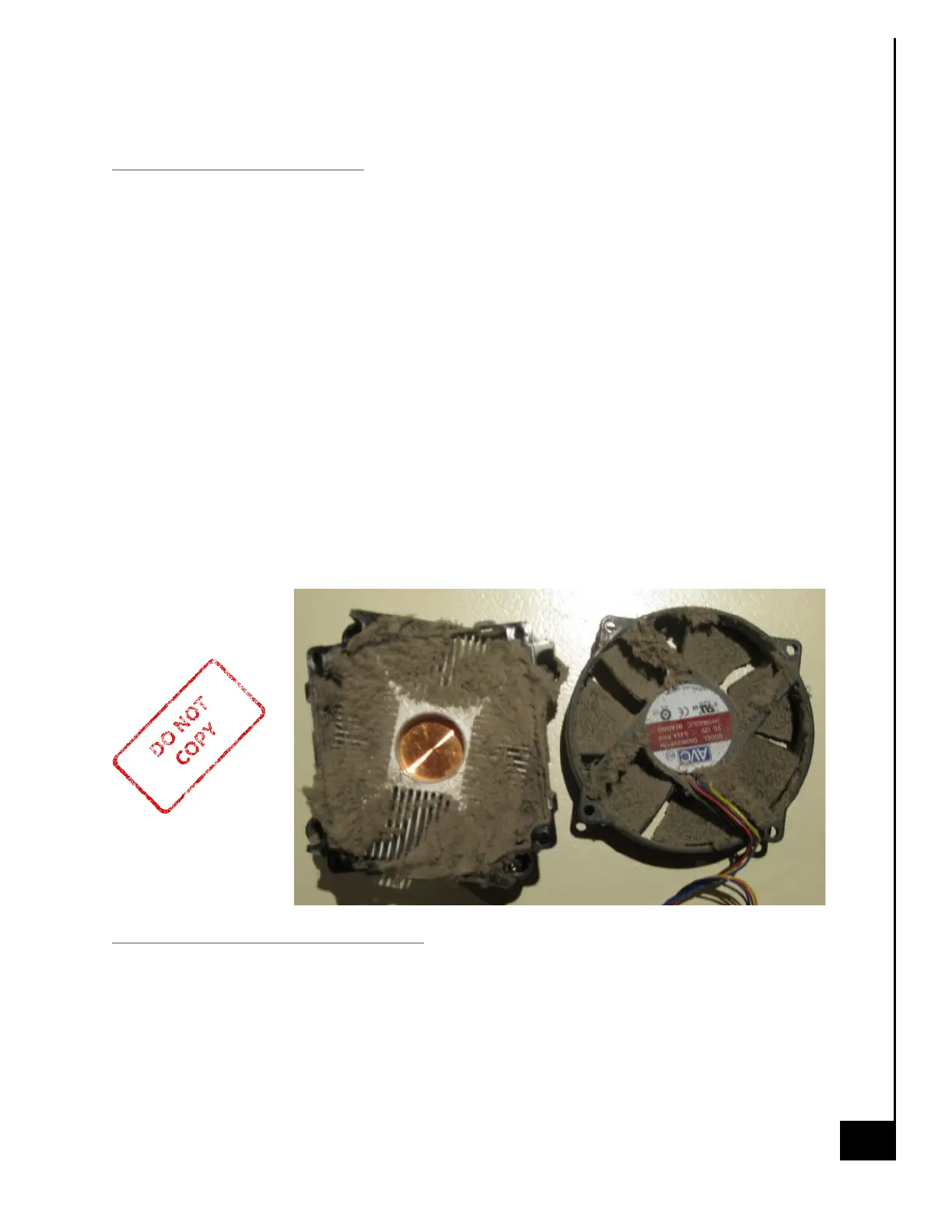
Dust buildup may lead to overheating and could potentially cause serious damage to your
PC components. If fans get clogged with dust, they may begin to turn at a slower RPM
reducing the effectiveness of the fan and leading to overheating of the PC. The issue of dust
build up is applicable to all fans within the system (e.g. case fan, CPU fan, AIO radiator,
GPU fans, etc.). If fans build up enough dust the motors may seize and completely fail,
requiring the fan to be replaced.
Regular Maintenance Steps
1. Remove PC from all power sources, unplug the system from the wall and/or surge
protector. It is best to let the unit set for a few minutes, pressing the on/off button a
few times to dissipate any energy the capacitors may be storing.
2. Compressed air is a great tool to remove dust quickly and safely. Remember to read
the instructions on the use of compressed air before use.
3. Remove all the large dust particle by hand and use the compressed air to blow away
and smaller residual particles.
4. Repeat about every 3 months or so, or as needed for areas that are more dust prone.
Virus and Malware Protection
You should check your PC often for malware. You can do this by running a scan using
Windows Defender, but for deep system scans, it is always good to use a secondary
software as well – just to be safe. There are multiple reputable Anti-Malware companies;
one that is commonly used is Malwarebytes. Running weekly deep system scans would be
the best choice.


 To Next Page
 Loading...