AUTO
SPEED
AUTO
MODE
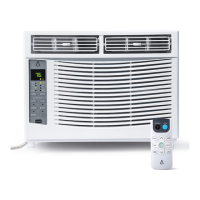
1. Digital Display:
Without timer setting, the operation mode is Cooling, Dry, Fan and Auto, and the set
temperature will be displayed. Time will be displayed under timer setting.
2. and Button:
Use these buttons on the control panel and remote to increase or decrease the Set
Temperature or Timer.
Temperature range: 61°F~88°F or 16°C~31°C.
3. Power Button:
Turn the air conditioner on and off.
4. Mode Button:
Press the mode button to cycle through the various modes: Cool, Dry, Fan and Auto.
Cool Mode: The cooling function allows the air conditioner to cool the room and at the
same time reduces humidity. Press the MODE button to activate the cooling function. To
optimize this function adjust the temperature by pressing the up and down arrows and
the speed by pressing the Fan Speed button.
Dry Mode: This function reduces the humidity of the air to make the room more comfor-
table. Press the MODE button to set the DRY mode. An automatic function of alternating
cooling cycles and air fan is activated.
Fan Mode: This function only works when the airconditioner is vented. Press the MODE
button to set the FAN mode. With pressing the FAN SPEED button, the speed changes
in the following sequence: HIGH, MED, LOW in FAN mode. The remote control also
stories the speed that was set in the previous mode of operation.
8
7 6
1
2
3
5
4
9
Your home in sync
14


 To Next Page