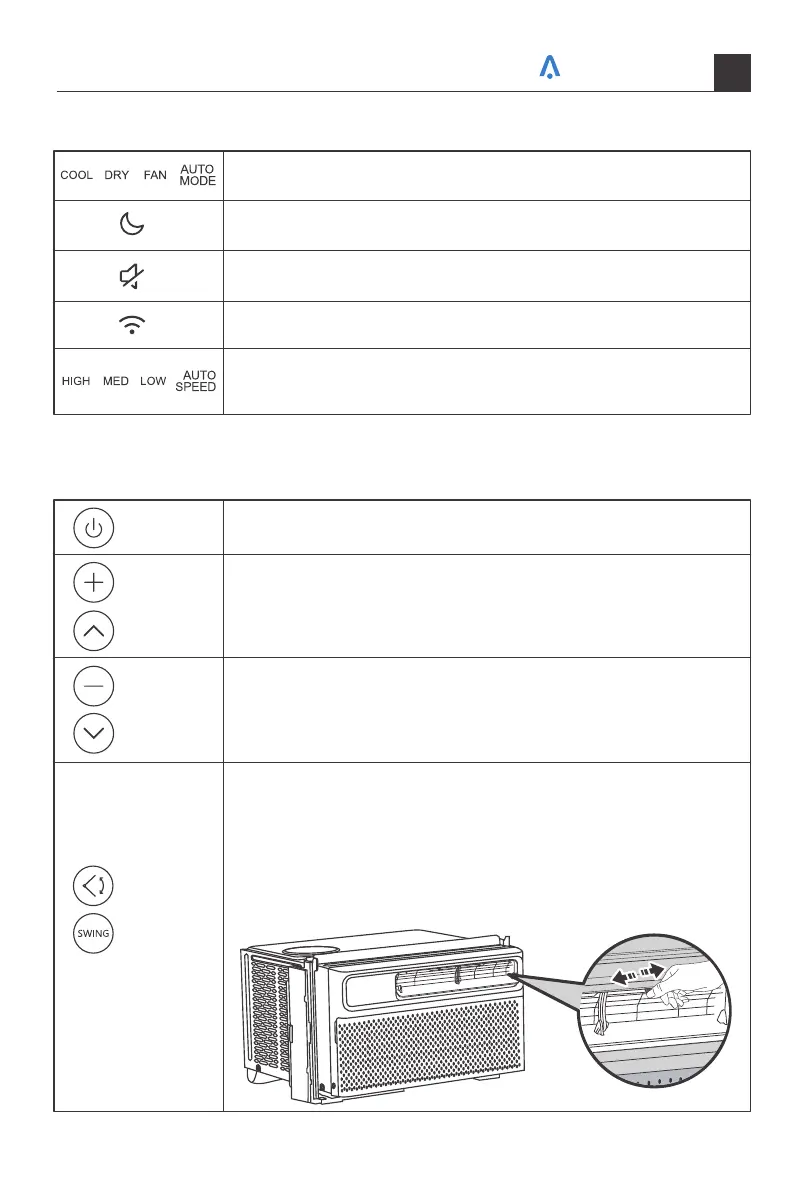
Indicates the unit is in Sleep mode.
Indicates the unit is in MUTE mode.
Indicates Cool, Dry, Fan, and Auto mode, respectively.
Indicates that there is a WiFi connection.
Indicates Low, Medium, High, and Automatic fan speeds,
respectively.
General Operations
Press to turn on the air condi�oner or switch it to standby mode.
Press to increase the air condi�oning temperature by 1F°/C°.
Press to decrease the air condi�oning temperature by 1F°/C°.
1.Press to make the louver move up and down.
2.Press again to stop the louver at the desired angle.
NOTE: To adjust the airflow direc�on horizontally, manually move
the levers located on top of the air outlet from side to side.
NOTE: Do not adjust the big ver�al louver by hand, otherwise will
cause damage.
Power
Button
Increase
Button
Decrease
Button
Swing/
Oscillation
Button
Your home in sync
22



 To Next Page