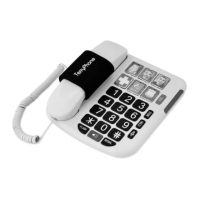
The Acenis TerryPhone (TP-01) is a landline telephone designed for ease of use, featuring a large button keypad and memory functions. It is suitable for users who prefer a traditional corded phone with enhanced accessibility features.
Function Description:
The TerryPhone serves as a standard landline telephone for making and receiving calls. It includes a speakerphone function for hands-free communication, redial for convenience, and a hold function with music. A key feature is its memory storage, allowing users to store frequently dialed numbers, including "picture keys" for visual identification of contacts.
Important Technical Specifications:
- Model: TP-01
- Connectivity: Corded landline connection.
- Dialing Modes: Pulse/Tone dialing mode switch.
- Ringer Volume: Adjustable (HI, LO, OFF).
- Memory Capacity: 3 "memory photo keys" and 10 "two-touch memories" (0-9).
- Call Indicator: Flashing call indicator.
- Speaker Volume: Speaker volume control switch.
- Flash Key: For switching between calls or custom call procedures (e.g., call waiting, three-party calling).
- FCC Compliance: Class B digital device, Part 15 of FCC rules.
Usage Features:
- Receiving Calls: Pick up the handset or press the SPEAKER button.
- Ending Calls: Pick up the handset or press the SPEAKER button.
- Hands-free Function: Press SPEAKER to dial, talk, answer, or end calls via speakerphone.
- Redial Last Number: Pick up the handset and press REDIAL to automatically dial the last number.
- Muting/Hold on Music: During a call, press HOLD to play music to the other party, muting your side. Press HOLD again to resume the call.
- Custom Call Function: Briefly press FLASH for call waiting or three-party calling.
- Adjust Ringer Volume: Use the ringer switch (HI, LO, OFF) to set the desired volume. The default is HI.
- Storing Numbers with Picture Keys:
- Pick up the handset.
- Press STORE button.
- Input the number.
- Press the desired PICTURE BUTTON.
- Replace the handset.
- Note: To insert a pause, press the REDIAL key during number entry.
- Making Calls with Picture Keys: Pick up the handset and press the corresponding picture key; the stored number will automatically dial.
- Storing 10 Two-Touch Memories:
- Pick up the handset.
- Press STORE button.
- Input the number.
- Press STORE AGAIN.
- Press Memory location 0 – 9.
- Replace the handset.
- Making Calls with Two-Touch Memories:
- Pick up the handset.
- Press AUTO button.
- Press Memory Location 0 – 9.
- The stored number will be dialed.
- Installing Memory Button Pictures:
- Print a picture (e.g., a face).
- Lay it over the provided button-shaped card.
- Cut to the correct size using the card as a guide.
- Place the picture into the desired memory button.
- Wall Mounting: The phone can be wall-mounted. Instructions include drilling a 6mm hole, installing a conduit, and screwing a 27mm screw to secure the device. A plastic tab beneath the earpiece cradle needs to be reversed to create a hook for secure handset placement when wall-mounted.
Maintenance Features:
- Troubleshooting - No Function: Unplug the phone, disconnect all cords, and reconnect them.
- Troubleshooting - No Ringing or Dial Tone:
- Check the connection between the base unit and the wall socket, ensuring the straight-line cord is used and connected to the TEL-LINE port.
- Verify the connection between the handset and the base unit using the coiled cord, connected to the port on the left side of the phone.
- Check if the telephone line is working by connecting another device to the wall socket.
- Troubleshooting - Can Receive Calls but Can't Dial Out: Switch the T/P (Tone/Pulse) switch on the side of the phone. Most modern networks use tone dialing (T).
- Troubleshooting - One Ring Only and Line Broken:
- If using a multiple connector box, ensure it is working correctly.
- Check for parallel units on the same line and remove them if present.
- Overwriting Memories: Simply repeat the storage sequence to program new numbers over existing ones.
- Deleting All Memories (Hard Reset): Disconnect the telephone line (power source) for 30 minutes.
- Environmental Disposal: The device should be collected separately from regular household waste for recycling of electrical and electronic equipment. Consult local authorities or waste collection centers for proper disposal.
- Regulatory Compliance: The device complies with FCC rules, designed to provide reasonable protection against harmful interference. If interference occurs, measures like reorienting the antenna, increasing separation from the receiver, or connecting to a different circuit are suggested. Any changes or modifications not expressly approved by the manufacturer could void the user's authority to operate the equipment.
For warranty service or other issues, users can contact customerservice@acenisinc.com. A "HOW TO VIDEO" for setup is available at https://www.acenisinc.com.

 Need help?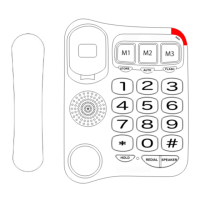

 To Next Page
 General