Need help?
Do you have a question about the ACENIS TerryPhone TP-02 and is the answer not in the manual?
Instructions for mounting the telephone unit on a wall, including drilling and securing the handset.
Description of six keys for storing and dialing favorite contacts with photos.
Explanation of the indicator light for incoming or missed calls.
Details on initiating emergency calls using the SOS button or remote.
Instructions on using the store button to save phone numbers into memory.
Explanation of how to place an active call on hold.
Information on increasing the volume for handset and speaker.
How to redial the previously dialed phone number.
Instructions for using the speakerphone for calls.
How to use the flash key for call waiting or transferring.
Details on the remote control for activating SOS dialing.
Controls for adjusting the speaker volume to high or low.
Controls for adjusting the handset volume to high or low.
The port used for connecting an additional telephone device.
The port for connecting the telephone line to the base unit.
Switch to adjust the ringer volume to high or low.
Switch to enable or disable the SOS mode functionality.
The connector for the power adapter (DC-5V).
Information on how to contact customer service for warranty or other issues.
Instructions on using the device safely, avoiding water and electrical hazards.
Guidance on how to clean the phone safely, avoiding liquids.
Warning against opening or tampering with the phone equipment.
How to answer and end phone calls using the handset or speaker.
Instructions for dialing and talking using the speakerphone mode.
How to redial the last number dialed.
How to mute the microphone or place a call on hold.
How to use the flash button for call management.
How to increase handset and speaker volumes.
Steps to perform a factory reset on the telephone.
Steps to print, cut, and insert pictures into memory button covers.
Procedure for saving phone numbers to picture memory keys.
How to make calls by pressing picture or one-touch memory keys.
Procedure for saving numbers to ten two-touch memory locations.
How to make calls using the stored two-touch memory locations.
Steps to delete one- and two-touch memory entries.
How the SOS button or remote initiates speakerphone and dials stored numbers in a loop.
The recorded message received by emergency contacts during an SOS call.
Note that SOS function requires DC adapter power supply.
Steps to resolve issues where the phone has no function.
Troubleshooting steps for lack of ringing or dial tone.
Troubleshooting for issues where the line breaks after a single ring.
Checks for when the SOS emergency dialing is not working.
Steps to perform a factory reset on the telephone.
Information on FCC rules and compliance for Class B digital devices.
Guidance on proper disposal of the appliance as electronic waste.
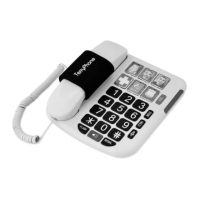
The TerryPhone TP-02 is a landline telephone designed for ease of use, featuring large buttons, picture memory keys, and an SOS dialing function. It is suitable for users who may benefit from simplified operation and emergency assistance features.
The primary function of the TerryPhone TP-02 is to provide standard analog landline telephone communication. It supports both handset and speakerphone modes for making and receiving calls. A key feature is its SOS dialing capability, which allows users to quickly contact pre-programmed emergency numbers. The phone also includes memory picture keys for one-touch dialing of frequently called contacts, making it accessible for users who prefer visual cues over number recall.

 To Next Page
 General