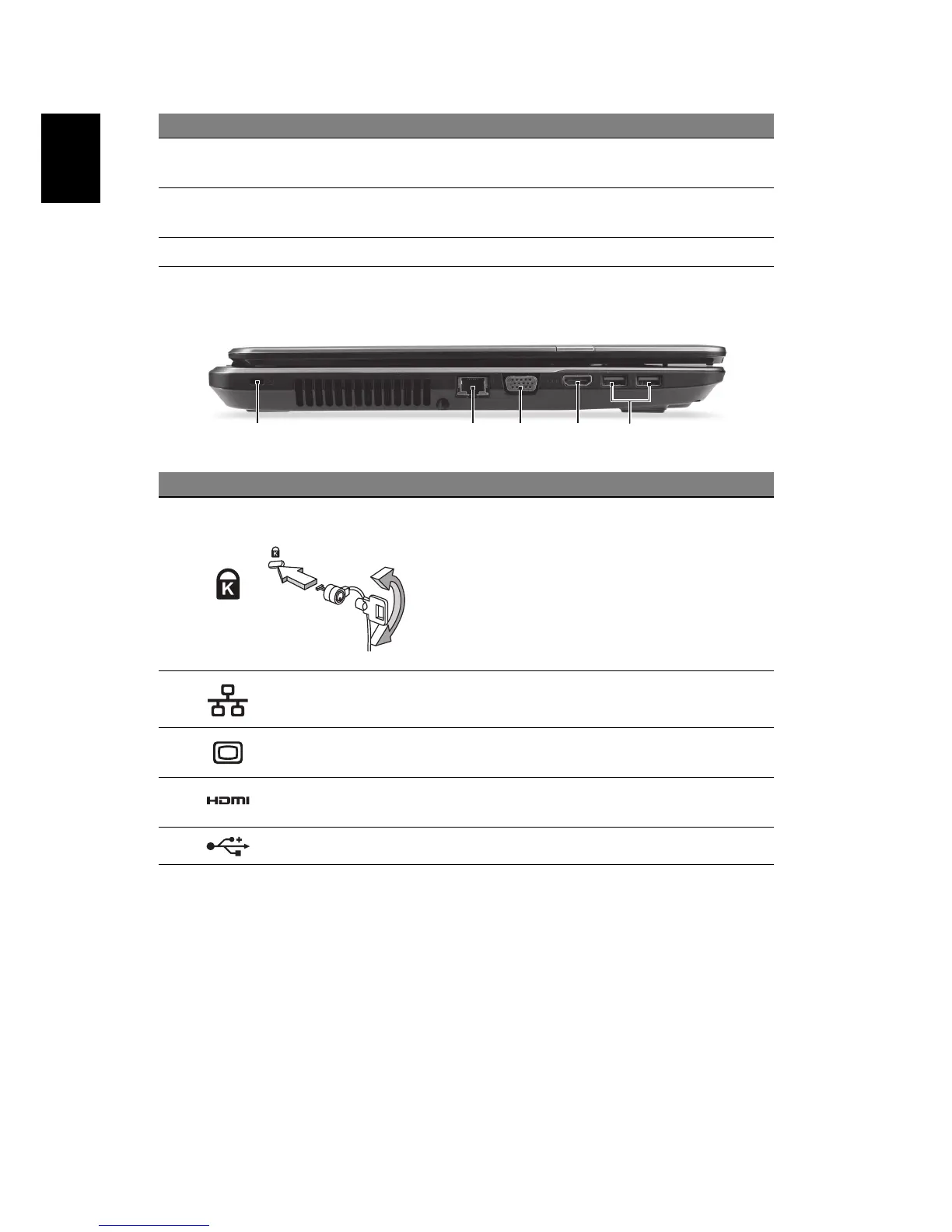
Left view
Information on USB 3.0
• USB 3.0 compatible ports are blue.
• Compatible with USB 3.0 and earlier devices.
• For optimal performance, use USB 3.0-certified devices.
• Defined by the USB 3.0 specification (SuperSpeed USB).
3Touchpad
Touch-sensitive pointing device which
functions like a computer mouse.
4
Click buttons (left
and right)
The left and right side of the button function as
left and right selection buttons.
5 Speakers Deliver stereo audio output.
# Icon Item Description
1
Kensington lock slot
Connects to a Kensington-compatible
computer security lock.
Wrap the computer security lock cable around
an immovable object such as a table or handle
of a locked drawer.
Insert the lock into the notch and turn the key
to secure the lock.
Keyless models are also available.
2
Ethernet (RJ-45)
port
Connects to an Ethernet 10/100/1000-based
network.
3
External display
(VGA) port
Connects to a display device (e.g., external
monitor, LCD projector).
4 HDMI port
Supports high-definition digital video
connections.
5 USB port Connects to USB devices.
# Icon Item Description



 To Next Page