14 - Using your tablet
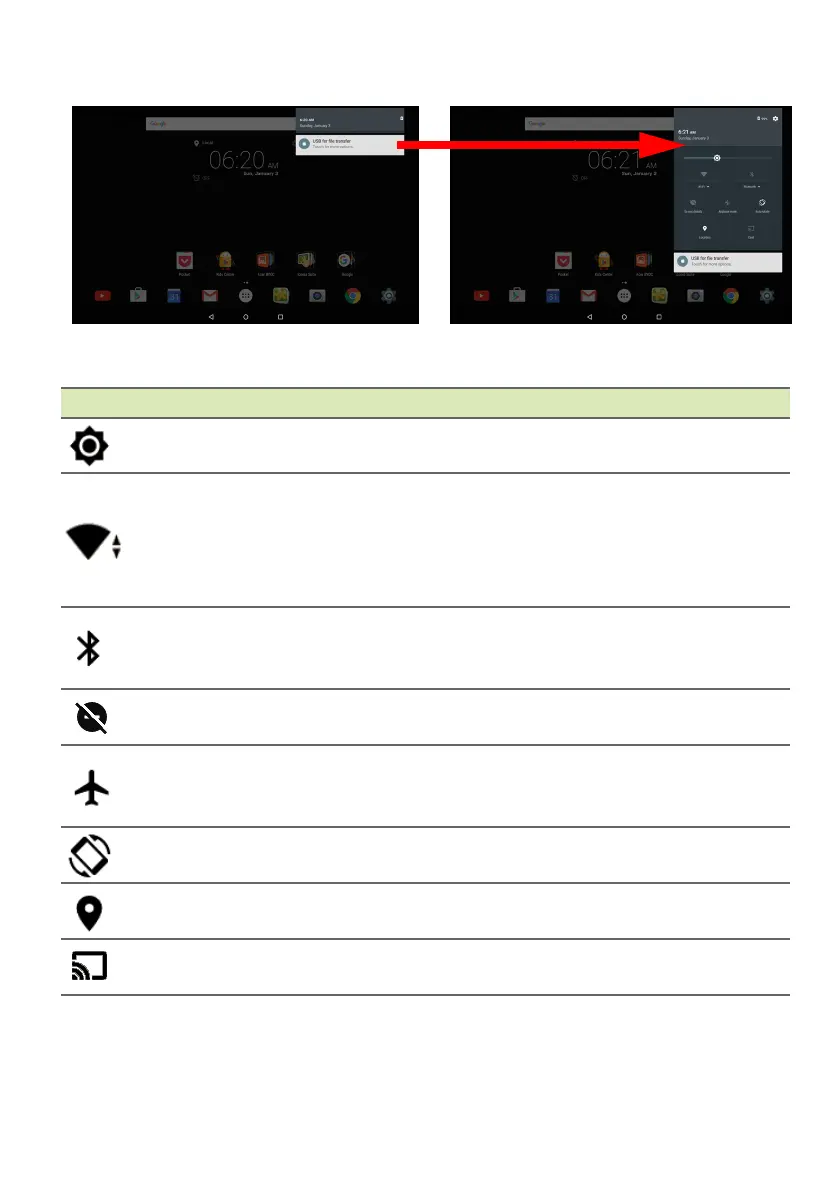
Quick Settings icons
Icon Name Description
Brightness Slide to adjust the screen’s brightness.
Wi-Fi
Tap to toggle Wi-Fi on and off (waves indicate
signa
l strength). Small "up" and "down" arrows
mean information is being transmitted and
received, respectively. Tap Wi-Fi (or the network
name) to display Wi-Fi settings.
Bluetooth
Tap to toggle Bluetooth on and off. Tap
Blueto
oth (or the device name) to display
Bluetooth settings.
Do not disturb
Tap to silence some or all n
otifications or alarms
at certain times.
Airplane mode
Tap to toggle Airplane mode on and off. When on,
all wire
less connectivity is disconnected unless
you choose to turn a network on again.
Auto rotate
Tap to toggle automatic screen rotation on and
of
f.
Location
Tap to toggle your device’s location services on
an
d off.
Cast
Connects to wireless display-enabled displays or
de
vices (such as dongles).



 To Next Page