36 - Using the camera and video recorder
Camera
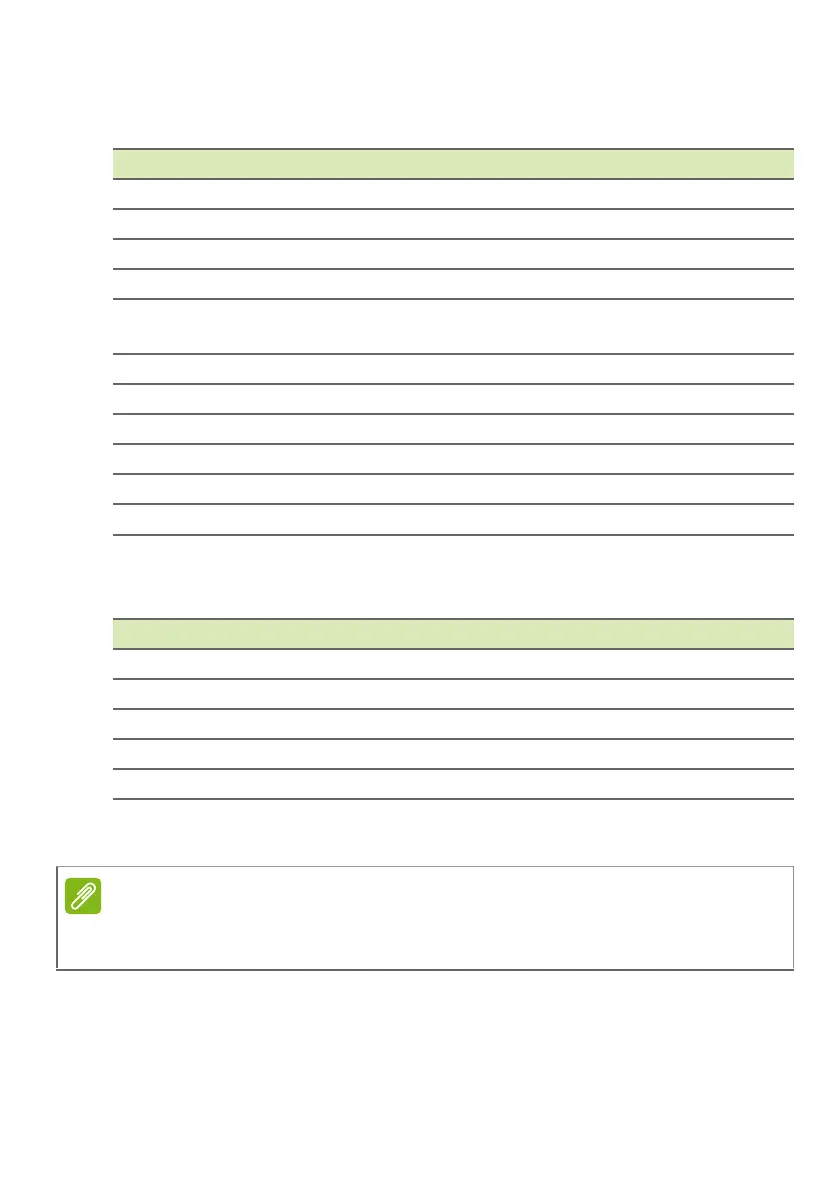
Adjust camera image settings with these options:
Video
Adjust video settings with these options:
Supported formats
Setting Options
Zero shutter delay On / off
Anti-shake On / off
Voice capture On / off
Face detection On / off
Auto scene
detection
On / off
Self timer Off / 2 seconds / 10 seconds
Capture number 40 shots / 99 shots (for Continuous shot)
Picture size 1 megapixel / 5 megapixels
Preview size Full screen / Standard (4:3)
ISO Auto / 100 / 200 / 400 / 800 / 1600
Face beauty Default / Wrinkle removal / Whiten
Setting Options
EIS On / off (electronic image stabilization)
Microphone On / off
Audio mode Normal / Meeting
Time lapse interval Off / 1 / 1.5 / 2 / 2.5 / 3 / 5 / 10 seconds
Video quality Low / Medium / High / Fine
To see the supported image, video, and audio formats, see Supported
formats on page 46
.



 To Next Page