9Installing or removing the battery
LED indicator
Charge indicator:
Installing or removing the battery
Your smartphone uses a replaceable battery to provide power. It is packed
seperately from your smartphone and needs to be inserted and charged before
you can use the smartphone.
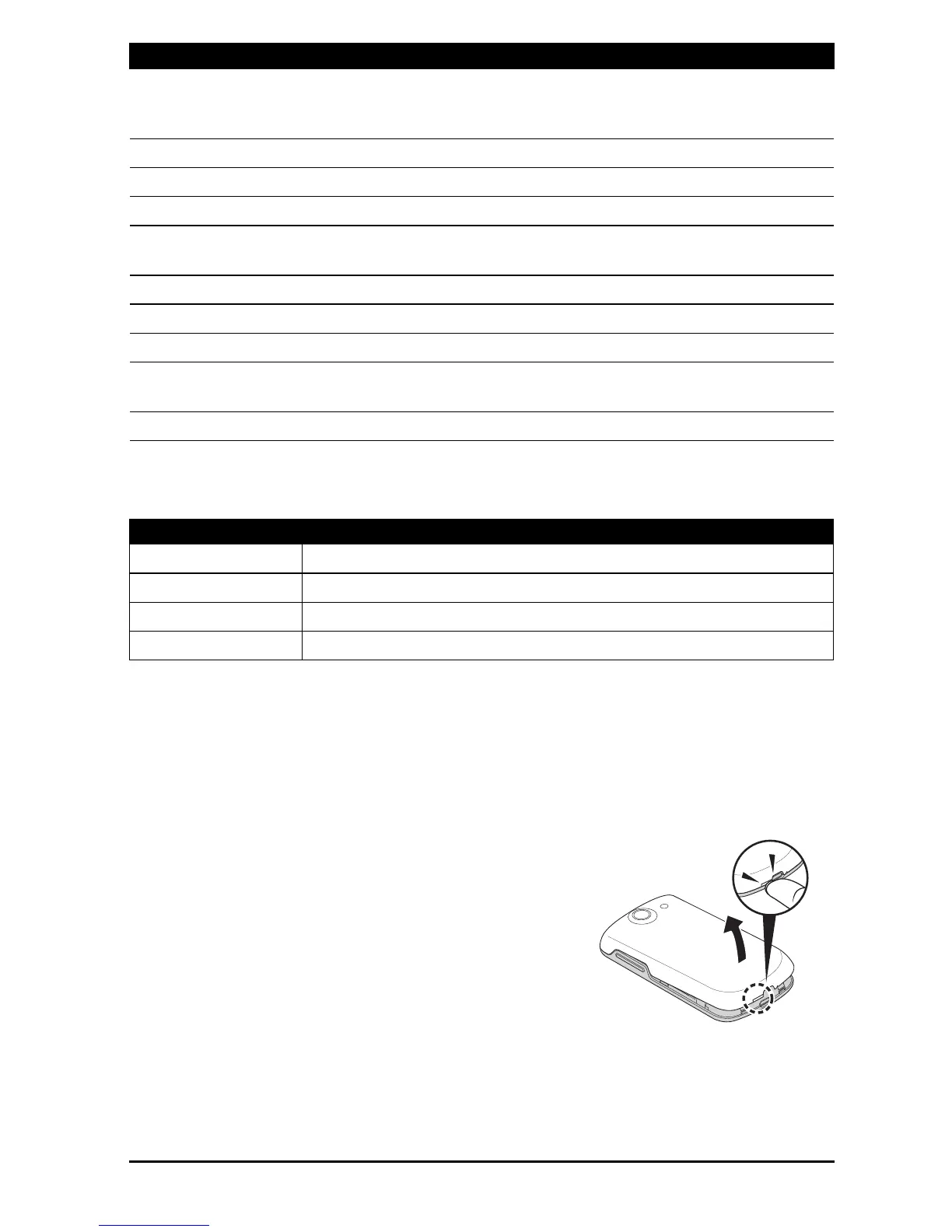
Installing the battery
Insert your fingernail into the cutout between
the battery cover and the phone. Unclip the
cover and lift off the battery cover.
7 End/Power button Press to end a call, turns the screen on/off or enters
sleep mode; press and hold to turn the smartphone
off.
8 Back button Goes back one menu step; close the keyboard.
9 Menu button Opens the option menu.
10 LED indicator Indicates battery level and event status.
11 Phone speaker Emits audio from your smartphone; suitable for
holding to your ear.
12 Volume up/down button Increases or decreases the phone volume.
13 Microphone Internal microphone.
14 Micro USB connector Connects to a USB cable/charger.
15 Handsfree speaker Emits audio from your smartphone; suitable for
handsfree use.
16 Camera A 3-megapixel camera for taking images.
LED state Description
Off Normal status.
Constantly on Device / USB plugged in: Battery is charging.
Slow flashing Device unplugged: Battery is low and should be charged.
Fast flashing Battery is critcally low and needs to be charged urgently.
No. Item Description



 To Next Page