EasyManua.ls Logo

Acer Zest - User Manual

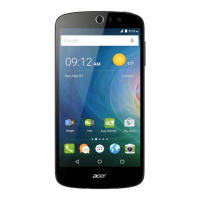
Acer Zest
97 pages
Print Icon
To Next Page IconTo Next Page
Loading...
1
Zest
SERVICE GUIDE

Questions and Answers

  • C
    casetimothyJul 27, 2025
    Why my Acer Cell Phone fail to power on?
    • B
      Brandy SimmonsJul 27, 2025
      If your Acer Cell Phone fails to power on, it could be due to the side key FPC not being welded well, in which case you should re-weld it. Alternatively, the side key FPC might be broken, and you would need to replace it.
  • G
    Gerald FieldsAug 5, 2025
    What to do if my Acer Cell Phone LCD shows a blank screen, white screen, or lines?
    • S
      Samantha WalkerAug 6, 2025
      If your Acer Cell Phone LCD is displaying a blank screen, a white screen, or lines, it could be due to several reasons. The LCD FPC or Link FPC might not be assembled correctly; in this case, re-assemble the LCD FPC or FPC. Another cause might be that the FPC or Link FPC is broken, or the FPC connector is damaged, which would require replacing the LCD or Link FPC. A software issue could also be the reason, so try re-updating the software.
  • S
    Sarah ClarkAug 17, 2025
    What to do if Acer Cell Phone LCD has a defective appearance?
    • R
      Rebecca VasquezAug 17, 2025
      If the LCD of your Acer Cell Phone has a defective appearance, it is likely due to scratches or damage to the LCD. In both cases, the suggested solution is to replace the LCD.

Summary

Chapter 1 Product Features and Hardware Specifications

Features

Summary of phone's main specifications.

Chapter 2 Diagnostic Utilities

Instructions for Flash Tool

Step-by-step guide for using the flash tool.

CID Modification SOP

Procedure for modifying the CID on the device.

Chapter 3 Service and Maintenance

Disassembly and Assembly Guide

Step-by-step guide for taking apart and putting the phone back together.

L2 Troubleshooting Guide

Troubleshooting guide for Level 2 technical issues.

Chapter 4 Diagnostic Tool SOP

Chapter 5 Serial Number Definition

Introduction of Acer FG SN

Definition and format of Acer FG serial numbers.

Acer Zest Specifications

General IconGeneral
SIMDual SIM (Micro-SIM, dual stand-by)
TypeIPS LCD
OSAndroid 6.0 (Marshmallow)
ChipsetMediatek MT6580
CPUQuad-core 1.3 GHz Cortex-A7
GPUMali-400MP2
Main Camera8 MP, AF
FeaturesLED flash
Video720p@30fps
LoudspeakerYes
3.5mm jackYes
WLANWi-Fi 802.11 b/g/n, hotspot
Bluetooth4.0, A2DP
GPSYes, with A-GPS
RadioFM radio
USBmicroUSB 2.0
SensorsAccelerometer, proximity
Size5.0 inches
Resolution720 x 1280 pixels (~294 ppi pixel density)
Card slotmicroSD
Internal8GB 1GB RAM
ColorsBlack, White

Videos

How to Reset & Unlock Acer Liquid Zest Plus

Related product manuals