Setting the KVM
Mode - Standard
HDMI
Picture
Color
Input
Full
Hot Key Assignment
DDC/CI
Wide Mode
On
On
Auto Source
Enter
Move
OSD
System
Save Sengs to...
Audio
Pertormance
X
C-Type
USB Port Select
HDMI Black Level
Normal
Quick Start Mode
Off
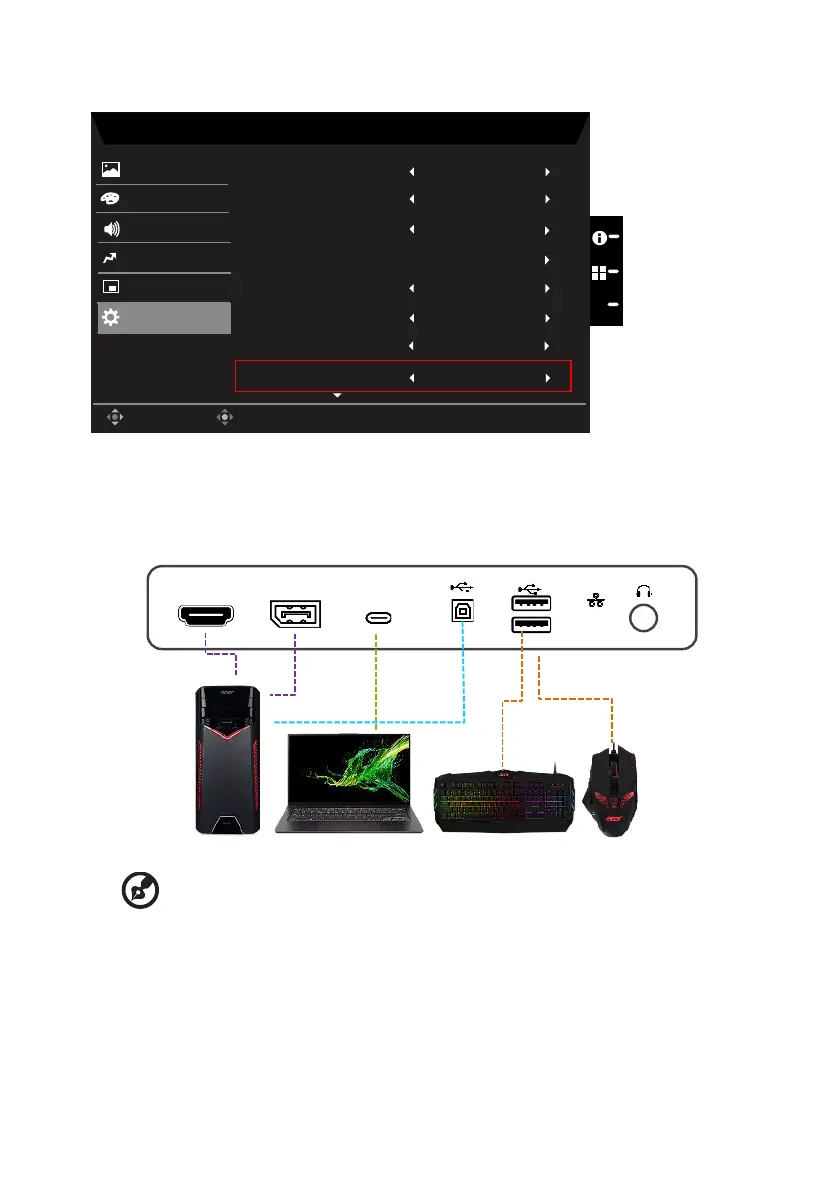
You can follow below instruction to set up KVM for your monitor:
• Connect Type-C/USB-B to your computer
• Select Type-C/USB-B of USB Port Select in the OSD
• Suggest setup:
DP/HDMI to PC Type-C to laptop USB-B to PC USB-A to keyboard/mouse
HDMI
DP IN Type-C
-----------------------------------------------------------------------------------------------------------
Note:
• When connecting two computers to the monitor, congure the USB settings
from the OSD menu to share a single set of keyboard and mouse connected
to the monitor between two computers.



 To Next Page